Monday, August 3, 2015

5 Ways to Take Advantage of the Google/Twitter Partnership

Here is what we know: Google and Twitter are partners.
Here is what we don’t know: The impact this will have upon search/social marketing.

In February, Google and Twitter agreed to a partnership that gives Google access to Twitter’s firehose, which is the term for Twitter’s stream of Tweets.

What is Google going to do with this information? The answer seems obvious. They will provide tweets in the SERPs for real time search results, right? After all, Google is a search engine.

Most likely, yes. But the fact is, we simply don’t know. Google is a search engine, but they’ve also made a pretty darn big social media platform, smartphone platform, and operating system among other things. They’re even involved in space travel.

Whatever they plan to do with it, we will probably find out in the next few months. Right now, however, we can prepare.

And what should we do to prepare? Since we don’t know how Google will be applying firehose information to their search algorithm, we must focus on the broader issues of search and social.

This article does not promise the end-all solution, but it is an attempt to help marketers get ready for whatever is coming.

1. Understand the extent of social search

We might as well begin with the basics.

Social and search are merging. This is no longer pie-in-the-sky conjecture. It is the reality of the here-and-now.

Already, social platforms have robust search algorithms built in to them.

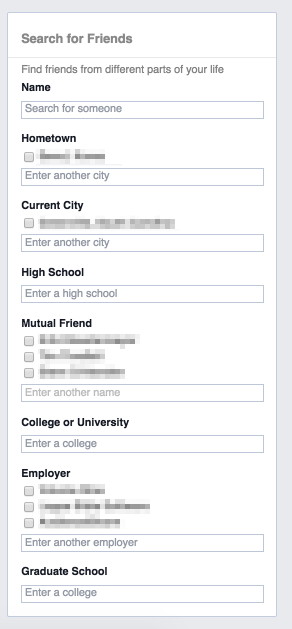
Facebook’s innocuous search bar can turn into a powerful social search. An advanced search can produce surprisingly focused results. I can even find friends who aren’t my friends.

facebook-advanced-friend-search

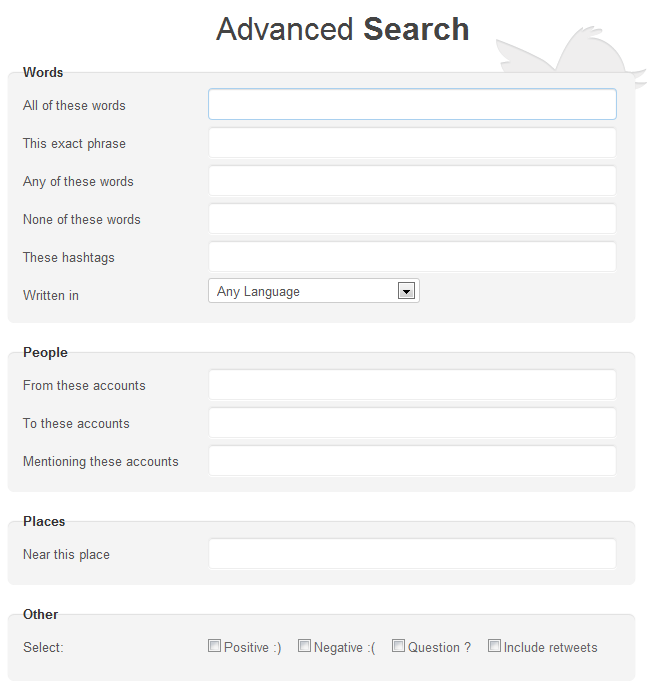
Twitter’s own advanced search provides even more flexibility. Twitter search can produce results with positive emotion, negative emotion, or questions.

twitter-advanced-search

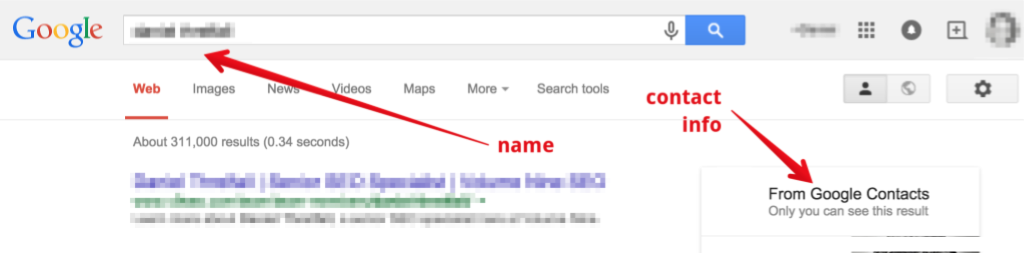
For Google users who are logged in, Google already returns Google+ results, which includes detailed contact information on users.

When I search for the name of someone in my Google+ circles, I get proprietary results drawn directly from my personal network.

google-circles-search

With Google and Twitter’s tighter relationship, we can now expect the existing search power of Google applied to Twitter in new and surprising ways.

Social media professionals should understand how search works, both from a social perspective and from a search engine perspective. Having an understanding of search will enable social media strategists to further advance the findability of their brands and specific social media campaigns.

Digital marketing professionals have long struggled with identity crisis, trying to determine how broad or deep they should be. Those who prefer specialized roles tend to clash with those who are digital marketing jack-of-all-trades. SEOs are told that they aren’t actually SEOs, and marketers and agencies alike are trying to shape up into a T.

Whether you’re a search professional or a social professional, you should realize that the boundaries between the two are blurred. Search professionals should understand how social affects their role. Social professionals should realize the impact of search upon their role.

Both must acknowledge that the lines of the playing field are being redrawn in new and startling ways.

2. Employ an ongoing social strategy

Admittedly, this is a broad application, but it’s one that I must insist on.

Twitter and Google’s partnership sends a clarion call to the digital marketing world: Social matters. Big time.

Brands — from enormous companies to individual personalities — must have a social presence. But social presence isn’t enough.

It’s now necessary to have an ongoing methodology for advancing a social media agenda.

In the early days of the web, a business thought that it was doing a good job simply by having a website. Websites were digital placeholders.

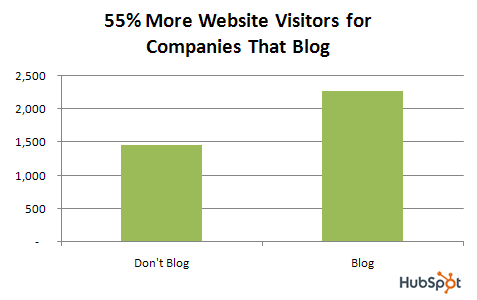
Then around 2009 we realized that brands needed to produce content on a regular basis! The blog boom was born.

benefits-of-blogging-for-companies-traffic

Source

Greater indexation, more pages, more visitors, more leads, more revenue — good things came to those who blogged.

We’re in a similar situation with social. A company that lacks a consistent output of social content isn’t going to last in the world of social.

As Google and Twitter merge their vast user bases and algorithmic technology, we’re going to see the importance of real time social search results.

Let me be very clear: Tweet regularly. Tweet often. Tweet a lot.

Keep your social output consistent and regular. Presumably, the better your posting velocity, the more likely you are to gain the right kind of attention and traffic.

3. Learn hashtag strategy, and use hashtags regularly

Hashtags will become more important than ever.

It’s likely that hashtags will help to drive search queries and Google’s search results. This is, admittedly, conjecture, but it seems likely that if tweets are part of the search results, then hashtagged terms within those tweets will also be searchable and visible.

It’s not a leap of logic to assume that any hashtagged queries will also produce additional Google results.

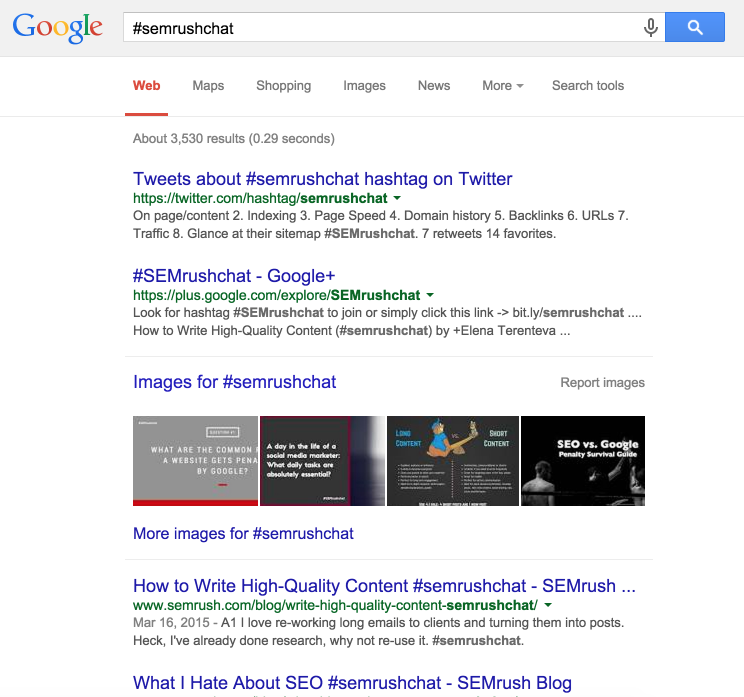
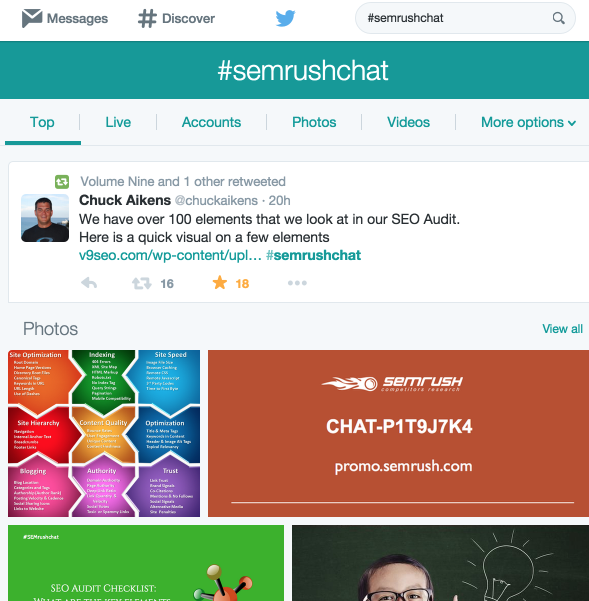
How can we be so sure? For one, Google already does this. Hashtagged queries get social results:

semrush-hashtag-google-search-results

The top result for #semrushchat is a Twitter page with that hashtag. SEMRush hosts Twitter chats, so the hashtag #semrushchat has plenty of action, images, and updates.

semrush-hashtag-twitter-results

Hashtags are the new keywords — not just for social activity, but search activity, too.

Since all the major social platforms use hashtags, Google search has been forced to adapt.

Now, your brand must adapt, too. Creating unique hashtags and capitalizing on the use of those hashtags will put you in a strong position to gain additional visibility and exposure s Google rolls out the application of their Twitter partnership.

For a quick visual summary of hashtags, check out this hashtag infographic.

4. Participate in trending topics

Twitter loves its Trends.

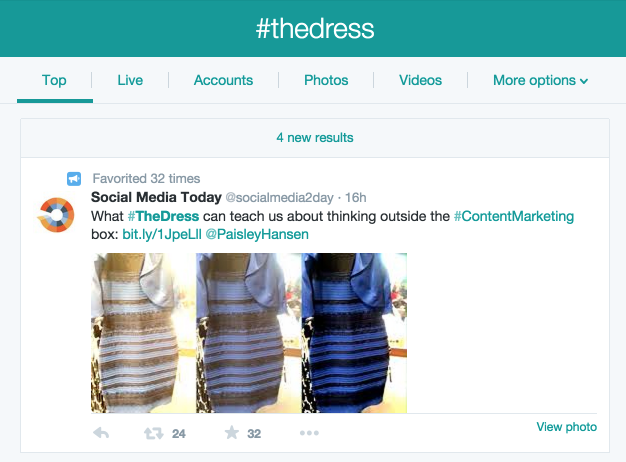
Users love it, too. Twitter trends are a way to discover what’s hot on Twitter. Trends can easily explode into worldwide sensations.

the-dress-twitter-trending

As Google jumps into the game, Trends will become even more significant in their real time search application.

Google can ascertain what topics are trending, but not with the same instantaneous algorithmically-powered accuracy that Twitter has.

A Googled trending hashtag can’t compete with Twitter’s live stream.

twitter-san-francisco-trends

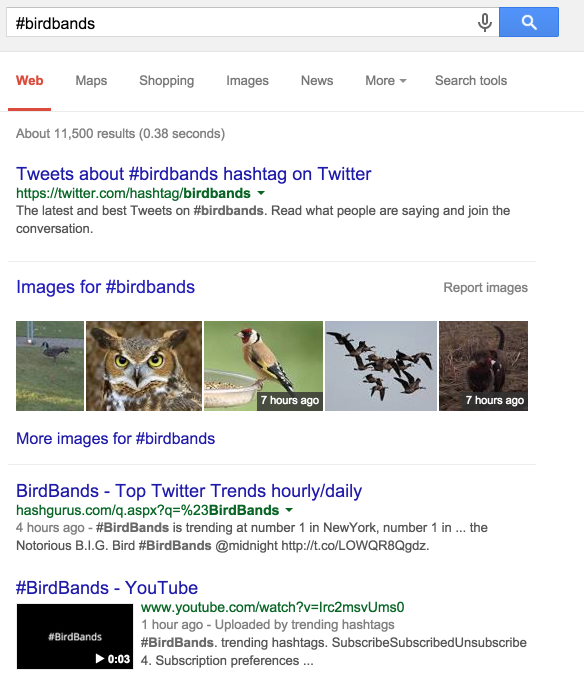
A Google query for #birdbands will give you this…

hastag-bird-bands-google-results

You get the idea that #birdbands is trending, but you don’t know why — not at a glance anyway.

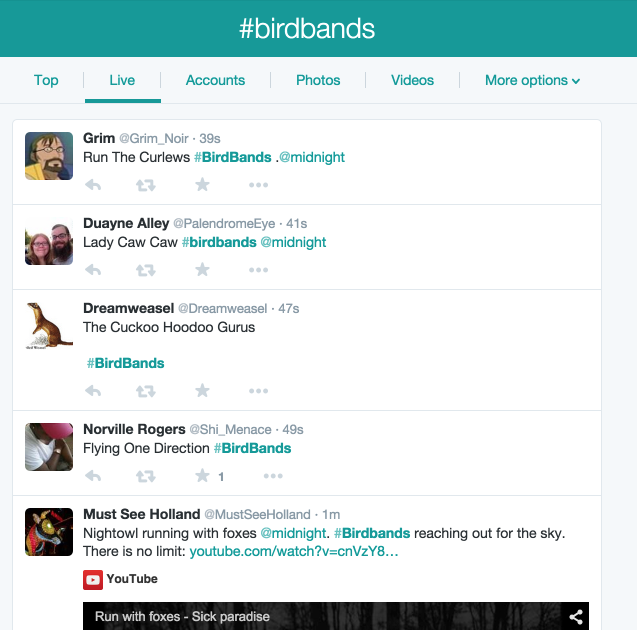
Twitter’s live stream, however, shows you this…

birdbands-twitter-hashtag-live-stream

Searching on Google means that you won’t get the joke at first. Searching on Twitter gives you complete understanding.

As Twitter and Google cozy up, Trends will be bigger and better than before. Twitter’s recent mobile changes mean that trends are more apparent and easier to find. As Google brings these trends into search visibility, we can expect it to improve even more.

5. Measure, track, and adapt

It will be interesting to see how the Google and Twitter partnership will affect the impact and ROI of social media.

In light of the coming change, keep close tabs on your social media record keeping. Be sure to align your social media efforts with your company goals. To this end, it will be helpful to inform your company’s search marketing team of the efforts.

Conclusion

My final recommendation is perhaps the most significant, but also the most obvious.

Keep using Twitter. If Twitter is partnering with the king of search, there is no way that the 14-character social media platform is on the decline.

This is the perfect opportunity to beef up your Twitter profiles, ramp up your tweet velocity, and strengthen your strategy.

Search and social are finally getting together, and it can only mean good things for social media marketing.

What do you think will be the biggest impact of the Google/Twitter partnership?

About the Author: is a lifelong evangelist of Kissmetrics and blogs at Quick Sprout.

Your Customers Like Long-Form Content Much More Than You Think They Do

Long-form content can boost customer conversions, a recent study found. So check out these tips for adding long-form content to your marketing mix. Read the full article at MarketingProfs

Your Business Should Be Testing Twitter’s 6 Retargeting Ad Features

twitter-retargeting

When it comes to social ads, Facebook is the leader of the pack. But, increasingly so, Twitter has been upping their game with an quickly improving social advertising feature set.

What I wanted to share with you today is the extent to which custom audiences are available on Twitter and other targeting options.

That’s right, my conversion-obsessed friends. You can currently get FIVE types of retargeting on twitter without having to get on your knees to get on some private beta list (like we do) or go through one of the ad partners.

Go log into your Twitter ads account and follow along.

This is my personal account here, not any of the special brand accounts we manage.

Screen Shot 2014-09-16 at 2.46.23 PM

That’s FIVE types of custom audiences.

  1. Emails
  2. Twitter usernames
  3. Twitter user IDs
  4. Mobile ad IDs
  5. Phone numbers

There is also website remarketing, like on Facebook, which came out on Twitter in June 2014. Grab your pixels here.

So technically, you have 6 types of remarketing.

The main targeting type you’ll use here is email addresses, the first option listed.

Screenshot 2014-09-17 05.37.39

How to think about twitter’s remarketing performance

Compared to Facebook custom audience tools, Twitter’s match rate (the number of emails, phone numbers, etc you can match to a Twitter profile) will be lower. And that the traffic you get will be much smaller.

Twitter has a much smaller user base (250 million versus 1.5 billion– though it differs by vertical/geo) and users aren’t checking Twitter 14 times a day, like on Facebook mobile (except for a tiny audience of power users of course).

With Facebook, we get a 70% email match rate on consumer companies and perhaps 15% for B2B.

Expect 10-20% of this on Twitter, so if your list isn’t at least 10,000 emails, it might not be worth your time yet.

This is the equivalent of focusing your search engine efforts on Google before moving to another search engine, like Bing or Yahoo, for ads or SEO.

Test with Facebook first.

When you’re doing social ad retargeting, your performance has nothing to do with Twitter’s ability to let you filter down on followers, hashtags, and keywords. These are people you already have in your email list and have been to your website.

So the approximately $10 CPM you’ll pay on the traffic in the United States, similar to the CPM on Facebook in the newsfeed, means that you’ll kick butt on Twitter if your email list and web traffic are clean.

Get web remarketing set up

For your website remarketing, go to the “tools” section, click on “conversion tracking,” and either create new or edit existing website tags.

At the bottom of each tag you configure, you get the option to use that pixel for remarketing.

Screenshot 2014-09-17 05.41.24

Sneaky, isn’t it?

While Facebook allows us to pass through attributes and specify booleans in their website pixels like here, Twitter doesn’t have this feature yet. This gets a little advanced, but is just another sign that Twitter is still trying to catch up to Facebook’s rich targeting feature set.

In plain English: you have to create one tag per website audience.

I’m not here to bash Twitter or say that Facebook is better.

Just expect that Twitter is rapidly rolling out awesome tools, just like Facebook is copying ad management features from Google AdWords.

Social ad remarketing has different names across platforms

Facebook calls these custom audiences.

Twitter calls these tailored audiences.

LinkedIn is rolling these out soon.

Same thing with paying to promote native social posts

Facebook calls sponsored post or promoted posts.

Twitter calls them promoted tweets.

LinkedIn calls them sponsored updates.

Objective-based social ads with retargeting, an industry standard

Whether you call it a post, a Tweet, a pin, a status, or whatever — you can do remarketing against it.

And then tie them to a business objective — website clicks, conversions, social engagement, app installs, or other goals.

Here is the objective-based buying flow for a Twitter ad campaign.

Screenshot 2014-09-17 05.56.15

A nice copy of Facebook’s!

Screenshot 2014-09-17 06.02.18

Someday we’ll be able to buy all retargeting on one place (note to AdRoll and Perfect Audience folks reading this– this means having marketing automation logic eventually drive all retargeting).

But for now, you should take a close look at testing Twitter’s awesome remarketing feature set. More social marketers need to be aware of this and testing it as an option.

4 Ways to Build Content Marketing Authority with SlideShare

SlideShare Content Marketing

Managing different types of content and where they fit into an integrated marketing mix across customer segments and stages of the buying cycle can be overwhelming. Amongst all the content that brands, publishers and consumers create, only the most authoritative sources are able to capture consumers’ attention.

Why is authority important in content marketing? Authority engenders trust, confidence and can motivate people to take necessary next steps.

Becoming authoritative in an age of information overload requires more than simply creating additional content. It requires content that attracts relevant audiences and engages readers to take action. Creating content authority also requires strategy, process and the right tools.

One of those tools is SlideShare. As a platform for hosting authoritative content, marketers can use SlideShare to build influence amongst interested subscribers, visitors from social networks like LinkedIn and readers that pull themselves to SlideShare content through search engines.

There are many forms of content published on SlideShare. Four types that are particularly useful for differentiating your brand and creating authority include: evergreen, co-created, repurposed and curated content.

Here’s how content marketers can use these 4 types of content on SlideShare as a content marketing secret weapon for building authority, trust and reach where it matters most.

Evergreen Content

Content that withstands the test of time for relevance and usefulness is often considered evergreen. For example, if your company wrote on the topic of “What is Digital Marketing?” it would arguably be an example of an evergreen topic. However, if your topic was about “Top Digital Marketing Trends for 2015”, not so much.

Because evergreen content has a long shelf life, it has time to attract many readers, shares and links that combine to attract even more readers citing the content creating even more signals of authority.

Evergreen content is specific and deep in nature and can include: FAQ’s, comprehensive information on a topic or how-to’s and tutorials.

Example: HubSpot’s “20 Quick Tips to Make Blogging Way Easier”

This SlideShare deck represents both evergreen content in “how-to” form as well as crowd-sourced content since the tips came from the HubSpot community. Whether readers viewed this presentation last year or see it next year, the content is still relevant and useful.

Co-Created Content

Imagine that you have a “game changing” message to share with your community. Now imagine that you have a group of other reputable individuals that participate in creating and sharing that message. This is content co-creation or “participation marketing”.

Why co-create content? For one, content co-created with your community can be better because the collaboration of smart people with different perspectives creates a more trusted resource. Secondly, the potential for social amplification is much higher because when someone takes the time to contribute to a project that results in content, the likelihood of sharing it with his or her networks increases significantly.

Co-created content can take on many forms. Everything from blog posts to guides to eBooks like the one TopRank Marketing co-created with speakers at Copyblogger’s Authority Rainmaker conference.

By partnering with the community to create a useful content asset together, each individual participant spends less time creating and is inspired to spend more time helping to promote. Success of the co-created content object is in everyone’s interest.

Repurposed Content

When creating any content marketing deliverable, marketers should always consider additional ways the content can be repurposed. Deconstructing content into component parts, also known as modular content, enables marketers to get more value from the initial content investment. It also makes customizing the deconstructed content easier for specific target audiences.

As an example, Unbounce has blogged for several years about optimizing landing page copy, forms and how to increase conversions. Unbounce unleashed a Lead Gen Landing Page Course delivered by email over 7 days using much of the same content that was previously published.

Along with the course, Unbounce hosted a webinar for KISSmetrics titled “How to Design High Converting Lead Gen Landing Pages” reusing the blog content and posted the presentation to SlideShare.

There are many ways to repurpose content in ways that can be leveraged on SlideShare. From deconstructing an eBook into blog posts and blog posts into a SlideShare presentation to taking topically specific tips from a series of interviews or articles and compiling them into a themed presentation, there’s no end to extending the value of content.

Just keep in mind that repurposing only works if the resulting content is useful to readers.

Curated Content

Content curation can be described as identifying, gathering and repackaging content around a similar theme. It can be an incredibly effective, and fairly simple content marketing tactic to execute.

NewsCred took an incredibly simple topic, “content marketing quotes”, and turned it into a SlideShare presentation called “56 Reasons Why Content Marketing Works”.

The presentation is filled with quotes curated from some of the marketing industry’s leading authorities on content marketing. This type of curated content enables NewsCred to be a part of the content marketing “conversation” alongside industry experts without having to create much of the content themselves.

By publishing content on SlideShare that is evergreen and timeless, co-created with your community or industry influencers, curated from useful resources or repurposed in a relevant way, you can build your brand’s authority to attract, engage and convert new customers.

Just remember, SlideShare is a content marketing secret weapon, so be careful where you point it!

With well over 1 million views, you can check out the TopRank Online Marketing SlideShare collection of presentations and eBooks here.

This post originally appeared on the SlideShare Blog


Email Newsletter Gain a competitive advantage by subscribing to the
TopRank® Online Marketing Newsletter.

© Online Marketing Blog - TopRank®, 2015. | 4 Ways to Build Content Marketing Authority with SlideShare | http://www.toprankblog.com

The post 4 Ways to Build Content Marketing Authority with SlideShare appeared first on Online Marketing Blog - TopRank®.

The Five Elements of a Perfect SaaS Support System

If you’re a SaaS business, chances are support is one area of your business that you want to be flawless. Providing great support is the key to your growth and success. According to an Oracle study, 9 out of 10 customers have abandoned a business because of a poor customer support experience. You don’t want to be that business, do you?

At the same time, customer support can be the most time-consuming (and expensive) activity in your business if it’s not handled correctly. Hence, the way you provide support can make or break your business. It’s not one of those things you can do “quick and dirty” at first and then improve later. Well, you could, but that would be a very risky decision.

I’ve been running SaaS companies for the last 15 years. In the early days, support meant email, and that was not very efficient. Then came the help desks, the chat solutions, the knowledge bases, and a lot of tools that made support optimization possible.

In 2015, it’s much easier to build a top-notch support system, but despite all the available solutions and content on the topic, I still stumble upon SaaS products that are not doing it right. I’d like to share my experience with you so you can optimize your support process, too!

1. First and Foremost: Make Support Easy to Find

When an app user needs support, she’s already entered into “frustration mode.” In most cases, she’s trying to figure out something or trying to do something with your app and cannot do it intuitively. Maybe your product is too complex to be 100% intuitive, or maybe certain features are not user friendly enough. She may have encountered a bug or is missing a feature that is key for her. Whatever the reason, as soon as she needs an answer, she tries to locate the “support” link. And if she can’t find it within 5 or 10 seconds, her frustration grows.

I’ve lost count of the number of SaaS apps I’ve used that have hidden access to their support resources so well that it took me a full website audit to find it! We use Recurly to handle our subscription payments; look how well they’ve hidden their support link in the footer, in small print:

1 - Recurly-support-link

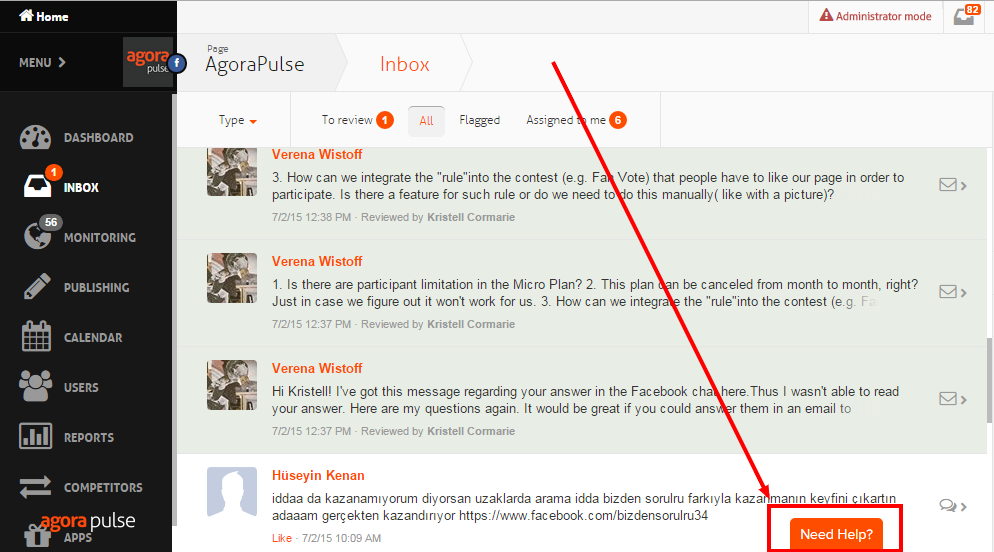
If you use our app, on the other hand, the support tab is much more obvious. It’s right there under your eyes at all times:

Agorapulse-need-help

Hiding your support resources or, worse, contact channels is NOT the kind of mistake you want to make. And there are no excuses, as the solutions to fix the problem exist and are not difficult to implement.

Ideally, your support contact form and your support resources should all be accessible via one very visible support tab or link.

Products like Zendesk, UserVoice, or Support Hero will do that for you. That’s an easy win that won’t take more than five minutes in most cases.

2. Make Sure Your FAQ Does a Good Job Helping Your Users

I don’t know about you, but most of the time, when I have a question about a SaaS product I’m using, I’d much rather find the answer on my own, in five minutes, than have to send a support ticket and wait on an answer for two hours or, worse, two days!

I’m not the only one. A recent study recently conducted by Zendesk showed that 67% of users prefer self-service support over speaking to a company representative. And a whopping 91% said they would use a knowledge base if it met their needs. No wonder all the major help desks offer a knowledge base along with their ticket management system.

But here’s the problem: if you ask any support person if they know how well their knowledge base is working, the answer you’ll get every time will be, “I have no idea.” I used to have the same answer with our own knowledge base. We had one – it took us days to build – but still, we had no idea if our investment was paying off.

We tried to leverage the statistics provided by the tools we were using, but, at best, the only stats we got were the number of times FAQ articles were read and the keywords users entered when they searched for answers. That didn’t really help.

These are the insights we were looking for:

  • What keywords our users were searching for when looking for answers
  • Whether we had content matching those keywords
  • What content users read or watched after searching for keywords
  • Which queries were successful and which ones failed to provide the answer sought
  • What ticket was being sent after a “failed” search

The software we finally decided to use was Support Hero. It had the advantage of giving us the information we needed in order to understand how well our self-help knowledge base was working and how we could improve it!

Thanks to these insights, we reduced our incoming support tickets by an astounding 50%. As you can see on the graph from our Helpdesk’s statistics, below, our inbound support ticket volume was becoming unbearable despite the existence of a knowledge base (hosted on UserVoice at the time). We gathered insights about the performance of our knowledge base, and, after two months of fine-tuning, we got back to a level we could manage.

Helpscout-ticket-volume-annotated

Basically, if you want to better deflect support tickets with your self-help knowledge base, you have to understand how well it’s working and use that knowledge to improve it.

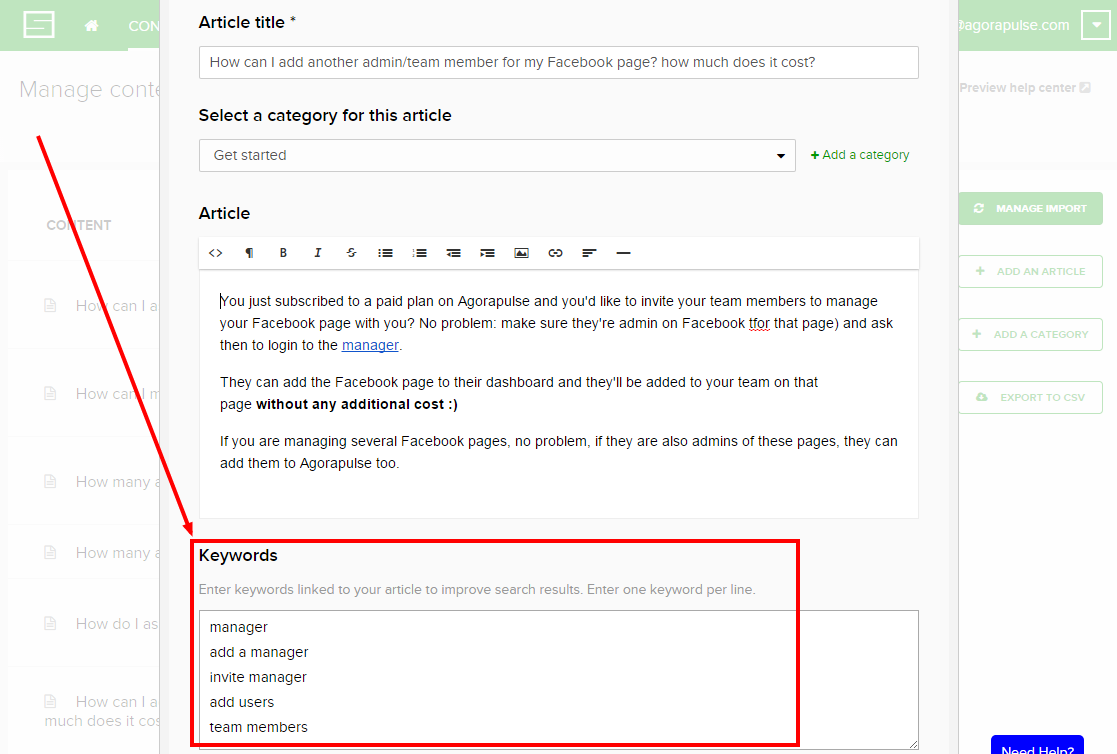
For example, we had a FAQ article explaining how to add other admins to an account on Agorapulse. That article referred to the word “admin.” But looking at the data we gathered through Support Hero, we quickly realized that our users were typing in a whole range of different words to search for this. For example, they used “team members,” “users,” or “managers.” For those three keywords, no article was showing up, leading to a support ticket every time. All we had to do was add those keywords to the FAQ as shown below and, presto, no more tickets on that feature!

add-team-member-faq

3. Understand Why You Get Support Requests, and Fix the Cause (When You Can)

Support requests usually fall into three major categories:

  • Bugs
  • Missing features
  • Confusing or hidden features

Bugs are the first problems you need to get rid of. But, honestly, having been in SaaS for years, I can tell you that you’ll always have bugs, especially if you’re building new features on a regular basis or making changes to your existing code. An optimized support process will not prevent bugs from happening, and the corresponding support tickets will come in. There isn’t much you can do here.

All SaaS products are, by definition, not finished. There’s no such thing as being done when you build a software application; there will always be features missing from your product. But if a missing feature keeps showing up in the support requests you get, adding that feature is probably not a bad idea. Not only will you receive fewer requests from your customers about it; but, more important, you’ll make them happier, and they’ll stick around longer.

If you decide that a feature should not be built (let’s say it doesn’t fit in your midterm roadmap), at least create a FAQ entry explaining why and offering alternative solutions. The last thing you want is a frustrated customer left wondering why you wouldn’t accommodate her.

But if you really want to get fewer support tickets, the category you need to pay the most attention to is the one of confusing or hidden features. A confusing feature is a feature your users were able to spot but couldn’t figure out. A hidden feature is a feature you actually have but users couldn’t find.

Both are problems, and they can be big problems. A good support system should help you quantify how bad the problems are.

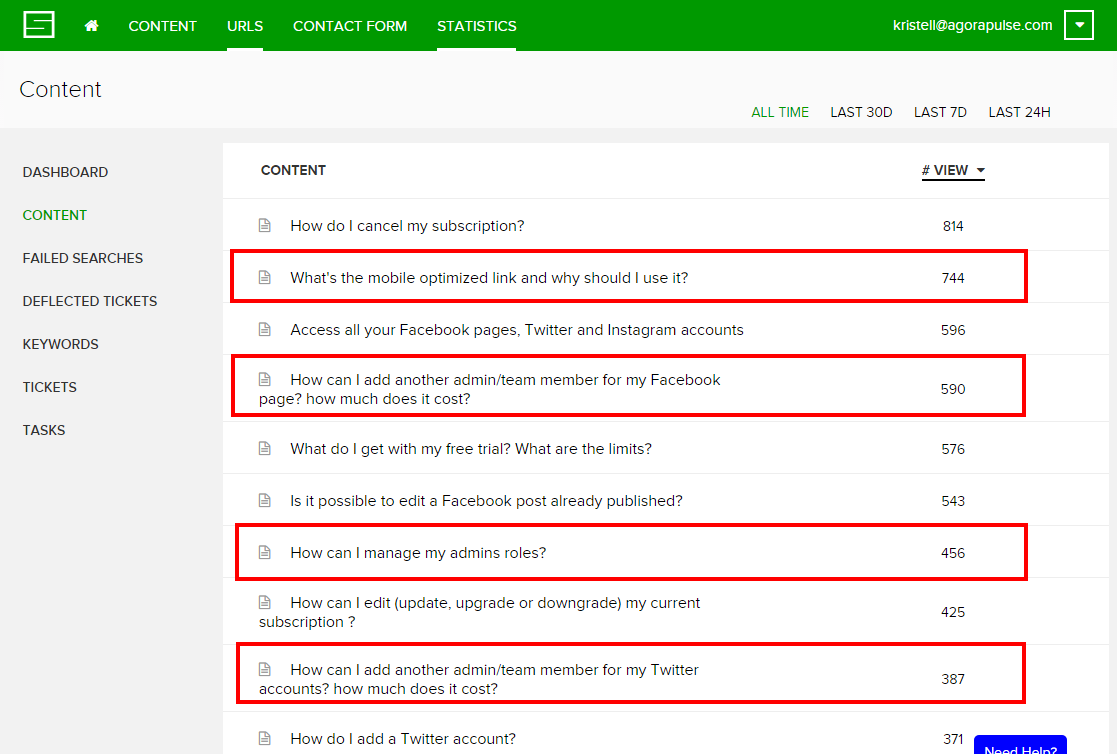
Let me give you an example we experienced firsthand. We recently had an internal debate about how our team feature was working. We were not agreeing on whether we were doing a good job of letting users manage their social media accounts as teams. So I called our support data to the rescue! I looked at our most-read FAQs, and guess what? The articles on team features were among the ones most read by our users:

most-viewed-articles-faq

Let me put it this way: if one of your features requires your users to read your knowledge base every time they want to use it, it’s definitely not doing a good job. A great product should be intuitive. I don’t know of any perfect product, of course, but if you look at your support data and identify a feature that requires your users to check your knowledge base all the time or search for answers, then working on making that feature more intuitive will definitely help. You will get more users as well as fewer support requests. Win-win.

Some support tools will help you spot the most-read articles or the most common search queries. To name a few: Help Scout, Groove, and Support Hero.

4. Make Sure All Support Requests Go To One Place

These days, communication goes in all directions – email, chat, in-app messages, Twitter, Facebook, and so on.

Your users don’t care what channel you prefer for support; they’ll use whatever is easiest for them at the time. Since most questions will arise as people use your product, you need to make sure that the way to contact your support team is very easy to spot (see above).

But you’ll always get emails from your website, Facebook messages, tweets, and even chat messages if you’ve decided to respond to your users in real-time. It can be totally overwhelming. Things start slipping through the cracks, conversation history is lost, and the list goes on. This is not sustainable. What you really have to do is concentrate most, if not all, of your support conversations in one place.

To communicate with our users, we’re using five different channels:

  • Email
  • Chat (Olark)
  • In-app messages (Intercom)
  • Facebook
  • Twitter

I have to say it’s challenging. And while we haven’t found any solution that would centralize everything, at least most of it goes to one place.

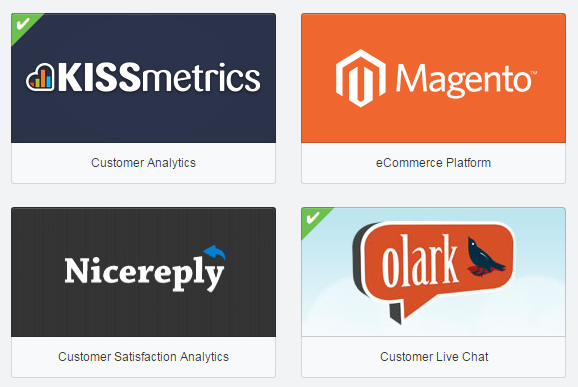
Our tool of choice to group all support requests is Help Scout. Thanks to its third party integrations, we are able to get all the Olark chats forwarded to Help Scout, so if we need to follow up on a chat conversation later by email, Help Scout does the job.

Apps-used-Help-Scout

We receive very few support requests on Twitter, a few more on Facebook. But compared with the 20 or 25 requests we get daily by chat or email, the 4 or 5 requests we get every week on our social channels do not create a real problem. And we use our own tool to handle those social messages – “eat your own dog food,” as they say!

The main problem comes from the conversations we have via Intercom. Intercom is our tool of choice for in-app user communication. But Intercom is far from being as versatile and comprehensive a support tool as Help Scout. Ideally, we should switch everything to Intercom, but given the disruption this would create for our support process as of today and the fact that we’ve based that process on existing Help Scout features, it’s a hard move to make.

Now that Intercom provides real-time chat (it didn’t when we decided to start with Olark) and better support features (it was beyond poor two years ago when we started using it for in-app messages on top of Help Scout for support), if I were starting from scratch today, I would go all-in with Intercom and wouldn’t use Olark or Help Scout.

Help Scout and Olark both offer features that we like very much and would miss, but having discussions with users across several channels is a bigger problem. And we could replace Help Scout and Olark with Intercom, but not the other way around.

However, Intercom is missing a key feature when it comes to providing top-notch support: a knowledge base! Without a knowledge base, my support team would end up in the nuthouse! Fortunately, the solution we use for that, Support Hero, has an API connection with Intercom, and using both together does a perfect job.

5. View Support Differently in Your App and On Your Website

Most SaaS CEOs think about product/technical support when they think about their support framework. They see support as a way to help current users understand how their product works and to help them solve bugs and technical issues.

It’s true that support in SaaS has always been primarily focused on helping current users of our products. But, limiting your support efforts to your current users is a big mistake.

There is actually a much larger population that expects support from you, and it’s a critical population for your business – your prospects. Actually, you probably have more prospects (i.e., website visitors) than current users, and ignoring them can be a very bad idea.

Your prospects will visit your website and check a couple of pages to get a general idea of your product. Maybe they’ll watch your video. If you’ve done a good job with your website, they’ll probably start becoming interested. But that’s also when they’ll start having questions pop up in their minds: Does your product connect with Salesforce? Is it available in Italian? Can we export our data in .csv? Is there a discount for nonprofits?

Most of the time, the answers to these questions will not be on your website. The goal of a website is not to address every potential question a prospective user has about how your product functions; its only goal is to sell the unique value proposition to convince them it’s worth their time digging around.

If you’ve succeeded in capturing the interest of prospects with your big value proposition, kudos to you. But don’t stop there; make sure they can also easily find all the cool features you have to offer.

To give you an example of that, I was recently looking for a new application to run NPS with our users. After a bunch of research on Google, I identified two potential solutions: SatisMeter and Promoter.io. They both had well-designed websites that conveyed their value proposition clearly.

But I needed answers to two important questions before making a decision:

  • Which one(s) will allow me to run a survey “in-app” instead of by email?
  • Which one(s) will connect to Intercom (my CRM of choice) to make sure I can correctly record the responses and leverage them?

Guess what? After scouting the two websites, I couldn’t find my answers. If the one(s) that were offering these features had allowed me to figure this out very quickly via a knowledge base, things would have been much easier and faster. Even more important, I would probably have ignored the competing solutions that were not responding to my questions!

Most important of all, I decided to eat my own dog food a couple of weeks ago and installed the Support Hero knowledge base widget on our website. So I verified all of the above: prospects are not looking for the same answers as current users; their questions will relate to your pricing, the languages you offer in your app, and all the nitty gritty options that you may or may not have (and, of course, which they badly need).

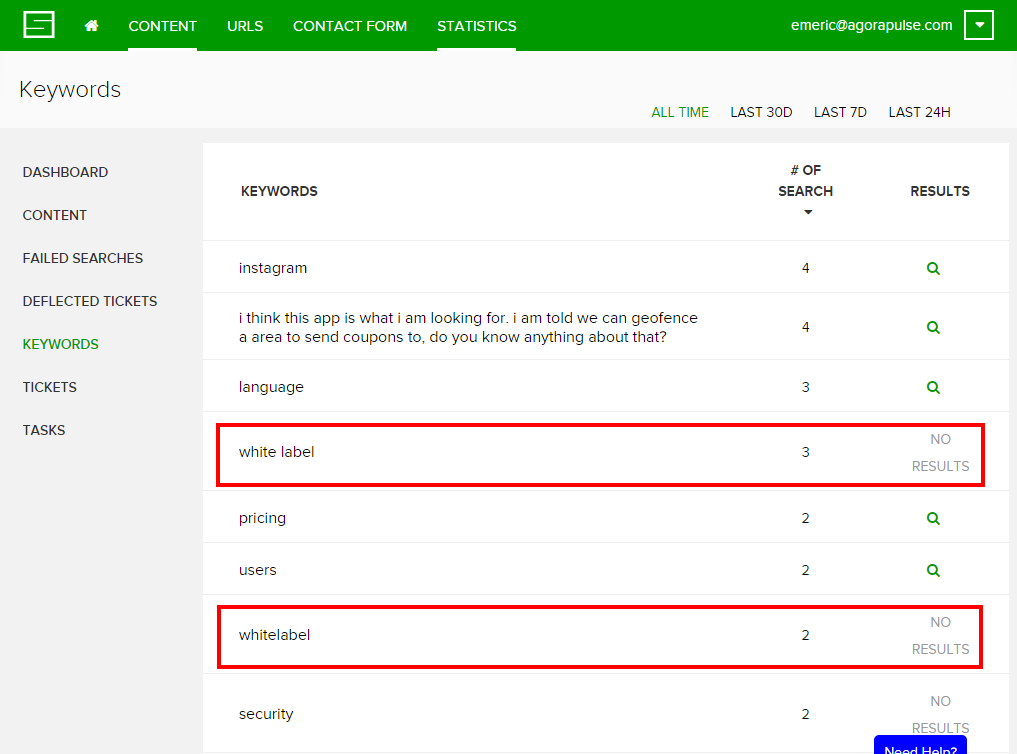
Now look at the screenshot below. Five users wondered if we had a white-label option. We actually do, but as you can see, no content was showing for those requests. I probably lost five customers because I didn’t do my job properly.

Support-on-the-website

Key Takeaways To Make Your Support Work For You (And Not the Other Way Around!)

First, you need to accept that support is not a “set it and forget it” kind of thing. Like everything else in SaaS, you’ll need to constantly iterate, analyze and improve. You’re being lean about your marketing? Your product development? Your pricing? Support is no different.

Second, make sure it’s easy to find support. This really is the most common mistake and it’s easy to fix.

Then, invest in self help support and keep in mind that more than two users out of three will rather find her answer on her own rather than contacting support. There’s a common misconception among startup founders that they need to talk to customers and support is a good way to do that. It’s actually not. When users get frustrated enough to contact your support, knowing that they’ll have to wait more than they’d like to get the help they’re looking for, they won’t be in the right mood to chat with you. Yes, it is a good thing to talk to customers. But it’s not a good thing to force them to do so by not providing them with self help answers.

Finally, understand that support is not a stand-alone activity, it is deeply entangled with everything else you’re doing: product design, missing or messed-up features, marketing and customer success. Make sure you include what you learn from support in everything else you do for your SaaS business.

Your turn. What’s your experience with support? What have you learned that I’ve missed in this post? I’d love to benefit from your experience too!

About the Author: Emeric is the CEO and co-founder of agorapulse, a Paris and San Francisco based Social Media Management Software launched in 2011. Agorapulse is currently being used by more than 5,000 businesses across 180 countries. He is a regular speaker at Facebook Marketing conferences such as the AllFacebook Marketing Conference, Facebook Success Summit, iStrategy and the Online Marketing Institute.

Sunday, August 2, 2015

Are You Ready for the Future of Adaptive Content?

A startling 94% of companies claim that personalization is a key component of their success. Meanwhile, 56% of consumers would happily purchase from a company that provides a good – not even great – personalized experience.

Those kinds of statistics aren’t just impressive, they’re actually driving a new form of content development: adaptive content.

This idea is the new kid on the block. For the purpose of this post, we’ll look at it from a twofold perspective. Adaptive content is a combination of:

  • Using personalization to enhance the customer experience, and
  • Preparing content for delivery across multiple platforms.

These two facets of the term work together to create a complete, well-rounded experience. By implementing it in your content strategy, you’ll turbo-charge your ability to build awareness, trust and engagement with prospects and existing customers.

Adaptive Content Provides a Personalized Experience

Every channel, device and scenario serve as puzzle pieces that make up the consumer journey. If you look at the hundreds of pieces individually, they don’t make much sense. But if you join them together, you can see the whole image clearly.

In content marketing, it’s time that we start looking at the big picture.

This happens through the development and implementation of a comprehensive content strategy. Your strategy should provide enough insight into the mind of the customer that you’re able to determine a clear direction for personalization.

The 5 Elements of Adaptive Content

Before we get any further into the nitty-gritty of adaptive content strategy, I want to talk about the elements you’ll want to look for during the initiative.

Karen McGrane is a superhero on this topic. If you haven’t read her book or heard her speak, you’re missing out on some really great information.

She outlines five elements of adaptive content that are critical to your success. Let’s talk about each of them briefly.

  1. Reusable Content – Develop content that you can use on multiple platforms. You also want the ability to create similar content in different formats to reach a wider variety of prospective customers.
  2. Structured Content – Create small chunks of content that can easily be consumed on multiple devices, regardless of their size.
  3. Presentation-Independent Content – This is the bare bones of your piece. It’s the raw content without ornate or ostentatious formatting.
  4. Meaningful Metadata – This hidden data quickly describes the purpose and intent of the content. This helps for easy interpretation by your viewers, as well as enhanced parsing by the search engines.
  5. Usable CMS Interfaces – Ultimately, you want a simple, functioning system that makes the delivery of all of the above elements possible.

Although I love the elements Karen uses, I think we can simplify it even more. I like to think of it in terms of the common phrase Reduce, Reuse, Recycle.

  1. Reduce the amount of work by systemizing your workflows and processes.
  2. Reuse content on multiple platforms and broadcast your message on every channel.
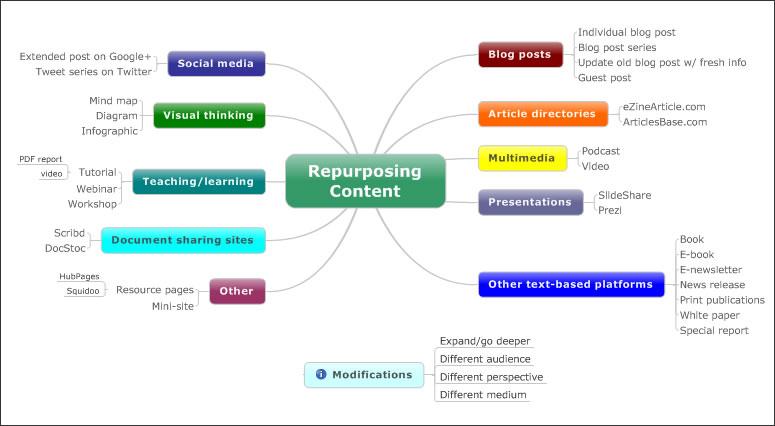
  3. Recycle (or, repurpose) the published work into different formats to get the most out of it.

repurposing-content

Source

Once you understand what adaptive content looks like, it’s time to create a stellar strategy…

Build a Strategy for Personalization

To begin, we need to first understand the five Ws. You probably remember them from grade school: who, what, when, where and why. By defining the project’s purpose this way, we’ll be better prepared to understand personalization from a strategic perspective.

1. Create Personas for Your Ideal Audience

Who is your audience?

It’s one of the first questions any content developer should ask themselves. Building a strong persona helps you properly cater to them. And that kind of attention can transform the casual visitor into a brand ambassador.

Before you can create effective adaptive content, you must understand your audience.

Step 1: Delve into an analysis of their goals, challenges and pain points. This will help you determine how to best distribute your content. Check out this overview of the 5 Rings of Buying Insight.

Step 2: Create complex, situational overviews of their needs. Get started by answering these questions about each type of audience member.

  • Who does the audience currently go to to consume a similar product or service?
  • Who would refer them to you?
  • Who do they speak to that may also express interest in your brand?
  • What kind of mood are they in when they find your company?
  • What devices are they using?
  • What interests do they have?
  • Why should they use your brand at all?

Step 3: Conduct primary research that brings even deeper insight. You can gather deeper information through things like:

Ultimately, the research you’ll conduct depends on your specific situation. Focus your efforts on creating a unique approach based on your audience, their needs and the type of business you run.

But one thing is the same, regardless: You must understand the who before you take any further steps.

2. Determine the Best Type of Content

What content best supports the audience?

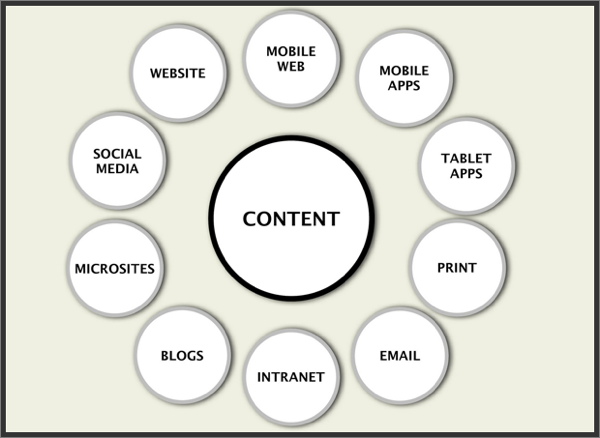
Too many people have a narrow mindset when it comes to content. They only think of it in terms of written messages or multimedia assets. And while both of those are important components, adaptive content comes from a much higher level of thinking.

where-content-can-appear-internet

Source

To understand what type of content works best, you’ll develop a distinct four-step workflow. These steps take you through research, architecture, development, testing, optimization and a high-powered launch. Once you’ve accomplished it, you’ll know what kind of content works:

  • Create in-depth personas and use cases.
  • Model functions and features to support user goals.
  • Nurture the relationship with the consumer.
  • Strategically launch, debug and refine the content.

Sound complex? Welcome to the future.

3. Establish Your Adaptive Characteristics

When should you actually adapt content?

By its very nature, adaptive content must adapt. That means, it needs to change based on certain characteristics of the individual audience member.

Step 1: Select the characteristics you’ll use to trigger adaptive content. A few options include:

  • Their current physical location.
  • The date or time of day.
  • What channel brought them to your content.
  • Recent purchase history from your company.
  • Where they’re at in the buying cycle.
  • Micro-conversions they’ve taken through the website.

Step 2: Create adaptive rules that trigger adaptive content based on what you’ve defined.

For example, let’s say you run a digital marketing agency. You could create the following piece of personalized, adaptive content:

  • When the home page is loaded by a user in a specific city, display: “We want to help a business in [city] grow through digital marketing. Will it be yours?”

Here’s an example of what that type of rule might look like in practice:

chelsei-adaptive-content

This kind of execution is intrinsic to adaptive content. Personalization happens through small pieces of content delivered in the appropriate context. When done well, it creates the kind of unique experience that users want.

4. Consider the Challenges of Different Devices

Where will you display the content?

Determine how you will visually represent your content, and what effect this will have on your content across different devices.
What looks good on a desktop can cause an unfavorable experience in mobile. With the rise of responsive web design, marketers are seeing the harsh reality of poor strategic presentation.

content-marketing-ensemble

Source

You need to consider the big picture. Truly adaptive content can serve the audience through quality publishing, regardless of the device used. To make this a reality, you’ll need to look at your publishing strategy from a few different angles.

  1. Consider current devices that will consume your content.
  2. Prepare for display challenges for each major device.
  3. Create intelligent content that can handle the quirks of each medium.
  4. Keep new & developing technology in mind for future adaptations (e.g. Google Glass)

Ultimately, you deliver a great experience to every user. That can’t happen with static content that only serves one device. Using these steps helps you focus on the dynamic possibilities.

5. Define Your Reason for Investment

Why are you investing in adaptive content.

You need to build a strong business case for adaptive content. It requires a vast investment of time and resources, so it’s important to understand and apply customer research data.

Build a business case for the executives involved in the decision-making process. You have to justify its benefit for your organization’s specific needs and goals, as well as show how adaptive content truly connects all the pieces of the marketing puzzle together.

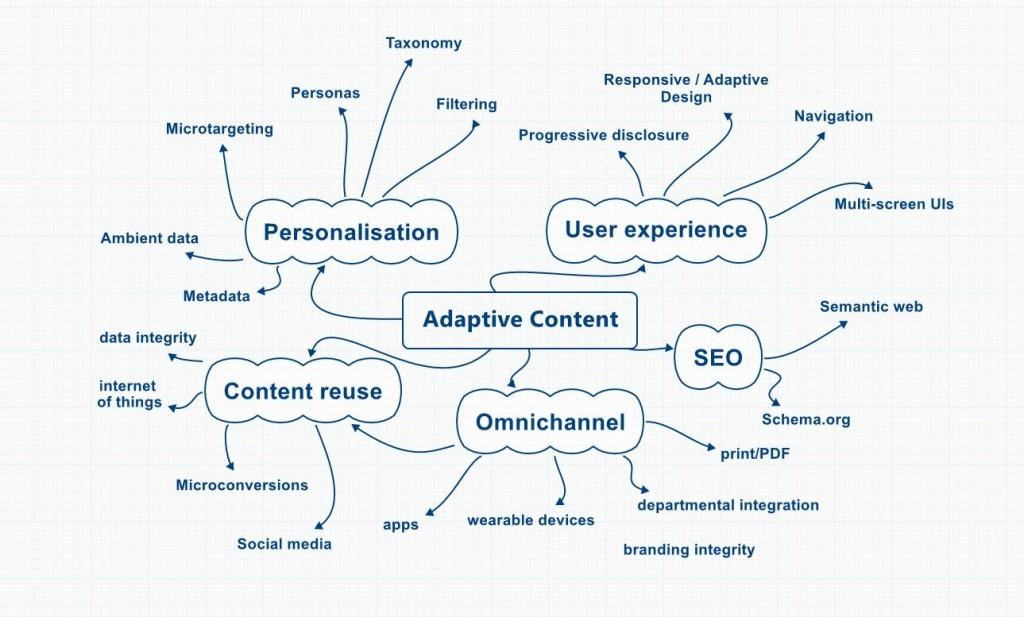
adaptive-content-visualization

Source

Take small steps to start implementing personalized adaptive content if you’re not ready to give it a 100% investment. Even small changes can yield long-term rewards. Start with the training wheels on and make small adaptations that will lead to larger ones down the road.

This is the future of content, and you need to jump on board now before it’s too late.

We’ve talked a lot about high-level complexities today. I’d love to hear your thoughts on adaptive content and how it will shape the future of our content marketing efforts. Share your ideas by leaving a comment below.

About the Author: Aaron Agius is an experienced search, content and social marketer. He has worked with some of the world’s largest and most recognized brands to build their online presence. See more from Aaron at Louder Online, their Blog, Facebook, Twitter, Google+ and LinkedIn.