Monday, August 3, 2015

The Five Elements of a Perfect SaaS Support System

If you’re a SaaS business, chances are support is one area of your business that you want to be flawless. Providing great support is the key to your growth and success. According to an Oracle study, 9 out of 10 customers have abandoned a business because of a poor customer support experience. You don’t want to be that business, do you?

At the same time, customer support can be the most time-consuming (and expensive) activity in your business if it’s not handled correctly. Hence, the way you provide support can make or break your business. It’s not one of those things you can do “quick and dirty” at first and then improve later. Well, you could, but that would be a very risky decision.

I’ve been running SaaS companies for the last 15 years. In the early days, support meant email, and that was not very efficient. Then came the help desks, the chat solutions, the knowledge bases, and a lot of tools that made support optimization possible.

In 2015, it’s much easier to build a top-notch support system, but despite all the available solutions and content on the topic, I still stumble upon SaaS products that are not doing it right. I’d like to share my experience with you so you can optimize your support process, too!

1. First and Foremost: Make Support Easy to Find

When an app user needs support, she’s already entered into “frustration mode.” In most cases, she’s trying to figure out something or trying to do something with your app and cannot do it intuitively. Maybe your product is too complex to be 100% intuitive, or maybe certain features are not user friendly enough. She may have encountered a bug or is missing a feature that is key for her. Whatever the reason, as soon as she needs an answer, she tries to locate the “support” link. And if she can’t find it within 5 or 10 seconds, her frustration grows.

I’ve lost count of the number of SaaS apps I’ve used that have hidden access to their support resources so well that it took me a full website audit to find it! We use Recurly to handle our subscription payments; look how well they’ve hidden their support link in the footer, in small print:
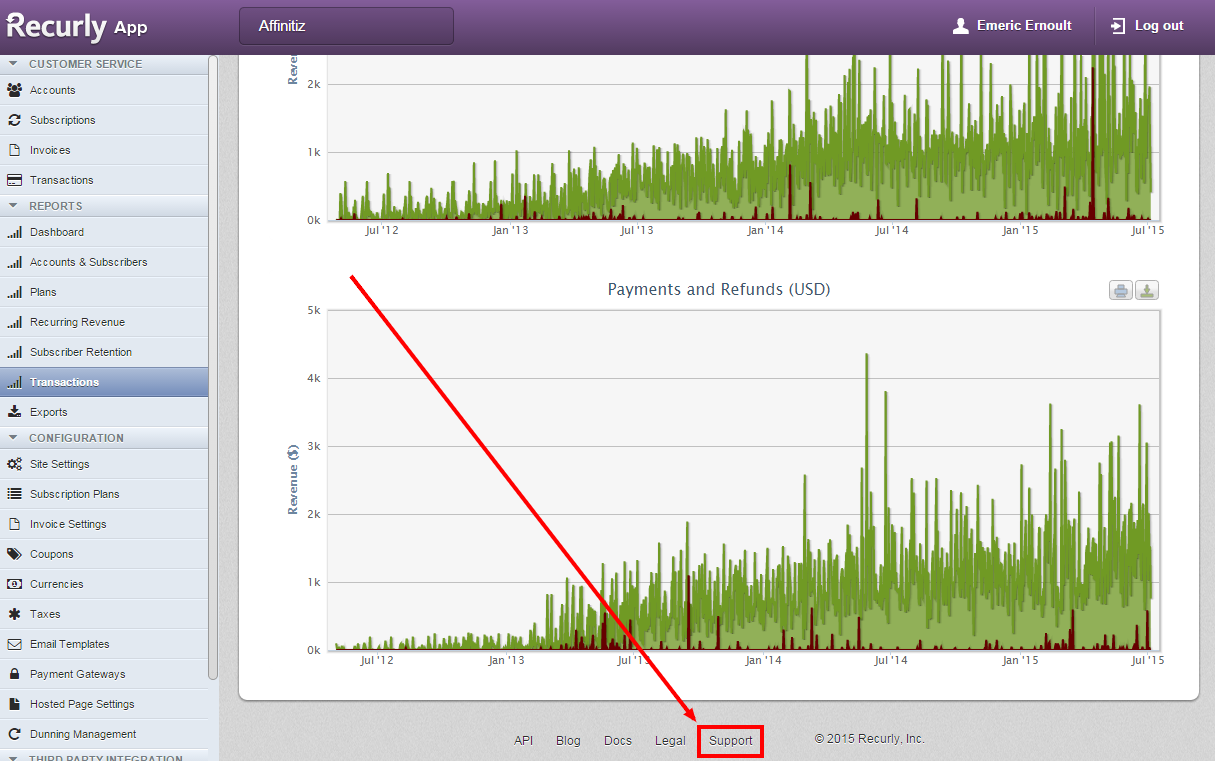
1 - Recurly-support-link

If you use our app, on the other hand, the support tab is much more obvious. It’s right there under your eyes at all times:
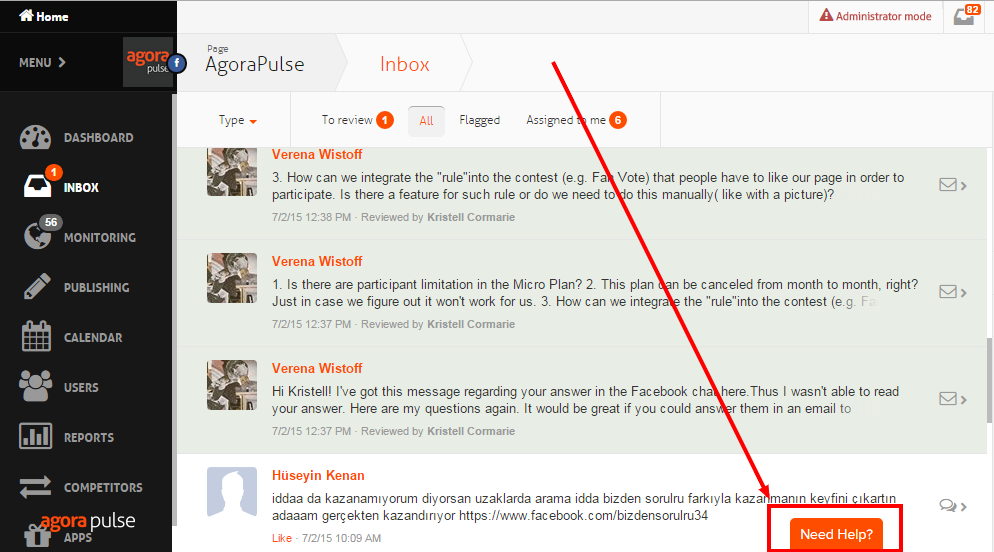
Agorapulse-need-help

Hiding your support resources or, worse, contact channels is NOT the kind of mistake you want to make. And there are no excuses, as the solutions to fix the problem exist and are not difficult to implement.

Ideally, your support contact form and your support resources should all be accessible via one very visible support tab or link.

Products like Zendesk, UserVoice, or Support Hero will do that for you. That’s an easy win that won’t take more than five minutes in most cases.

2. Make Sure Your FAQ Does a Good Job Helping Your Users

I don’t know about you, but most of the time, when I have a question about a SaaS product I’m using, I’d much rather find the answer on my own, in five minutes, than have to send a support ticket and wait on an answer for two hours or, worse, two days!

I’m not the only one. A recent study recently conducted by Zendesk showed that 67% of users prefer self-service support over speaking to a company representative. And a whopping 91% said they would use a knowledge base if it met their needs. No wonder all the major help desks offer a knowledge base along with their ticket management system.

But here’s the problem: if you ask any support person if they know how well their knowledge base is working, the answer you’ll get every time will be, “I have no idea.” I used to have the same answer with our own knowledge base. We had one – it took us days to build – but still, we had no idea if our investment was paying off.

We tried to leverage the statistics provided by the tools we were using, but, at best, the only stats we got were the number of times FAQ articles were read and the keywords users entered when they searched for answers. That didn’t really help.

These are the insights we were looking for:

  • What keywords our users were searching for when looking for answers
  • Whether we had content matching those keywords
  • What content users read or watched after searching for keywords
  • Which queries were successful and which ones failed to provide the answer sought
  • What ticket was being sent after a “failed” search

The software we finally decided to use was Support Hero. It had the advantage of giving us the information we needed in order to understand how well our self-help knowledge base was working and how we could improve it!

Thanks to these insights, we reduced our incoming support tickets by an astounding 50%. As you can see on the graph from our Helpdesk’s statistics, below, our inbound support ticket volume was becoming unbearable despite the existence of a knowledge base (hosted on UserVoice at the time). We gathered insights about the performance of our knowledge base, and, after two months of fine-tuning, we got back to a level we could manage.
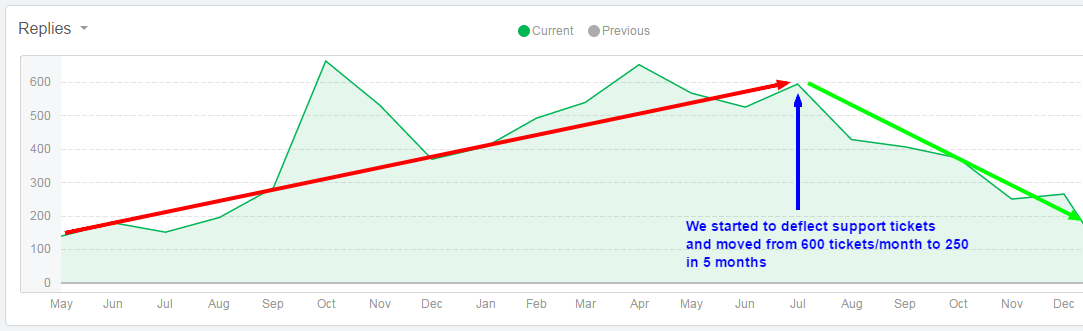
Helpscout-ticket-volume-annotated

Basically, if you want to better deflect support tickets with your self-help knowledge base, you have to understand how well it’s working and use that knowledge to improve it.

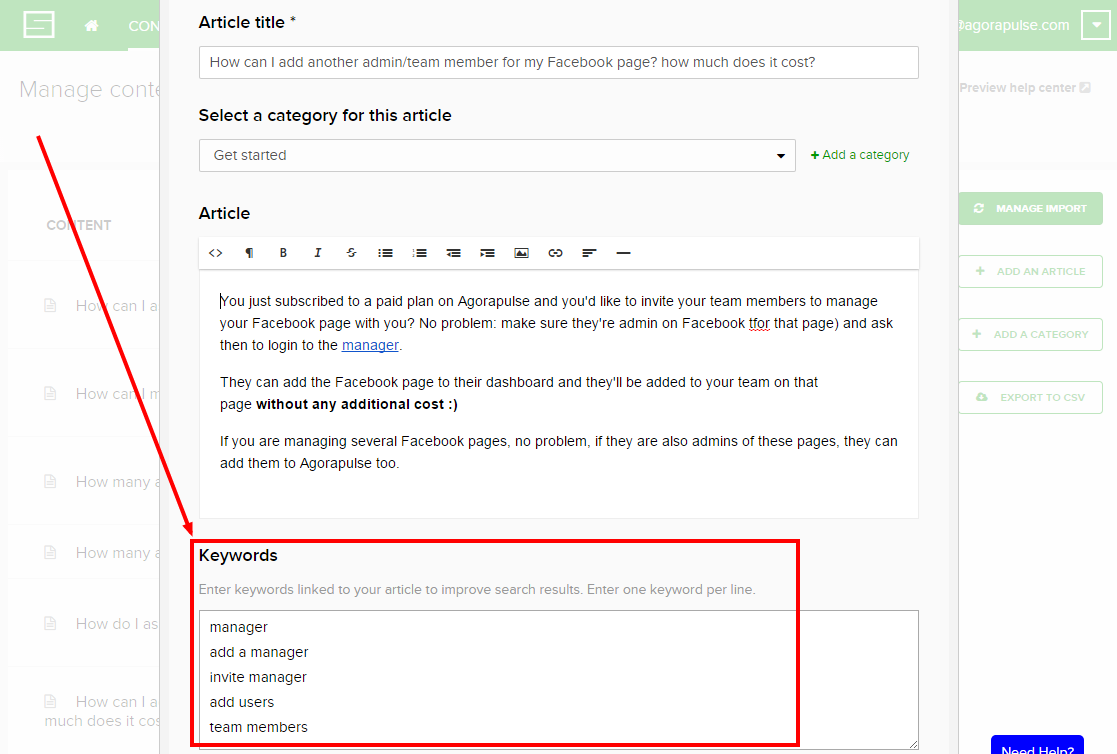
For example, we had a FAQ article explaining how to add other admins to an account on Agorapulse. That article referred to the word “admin.” But looking at the data we gathered through Support Hero, we quickly realized that our users were typing in a whole range of different words to search for this. For example, they used “team members,” “users,” or “managers.” For those three keywords, no article was showing up, leading to a support ticket every time. All we had to do was add those keywords to the FAQ as shown below and, presto, no more tickets on that feature!
add-team-member-faq

3. Understand Why You Get Support Requests, and Fix the Cause (When You Can)

Support requests usually fall into three major categories:

  • Bugs
  • Missing features
  • Confusing or hidden features

Bugs are the first problems you need to get rid of. But, honestly, having been in SaaS for years, I can tell you that you’ll always have bugs, especially if you’re building new features on a regular basis or making changes to your existing code. An optimized support process will not prevent bugs from happening, and the corresponding support tickets will come in. There isn’t much you can do here.

All SaaS products are, by definition, not finished. There’s no such thing as being done when you build a software application; there will always be features missing from your product. But if a missing feature keeps showing up in the support requests you get, adding that feature is probably not a bad idea. Not only will you receive fewer requests from your customers about it; but, more important, you’ll make them happier, and they’ll stick around longer.

If you decide that a feature should not be built (let’s say it doesn’t fit in your midterm roadmap), at least create a FAQ entry explaining why and offering alternative solutions. The last thing you want is a frustrated customer left wondering why you wouldn’t accommodate her.

But if you really want to get fewer support tickets, the category you need to pay the most attention to is the one of confusing or hidden features. A confusing feature is a feature your users were able to spot but couldn’t figure out. A hidden feature is a feature you actually have but users couldn’t find.

Both are problems, and they can be big problems. A good support system should help you quantify how bad the problems are.

Let me give you an example we experienced firsthand. We recently had an internal debate about how our team feature was working. We were not agreeing on whether we were doing a good job of letting users manage their social media accounts as teams. So I called our support data to the rescue! I looked at our most-read FAQs, and guess what? The articles on team features were among the ones most read by our users:
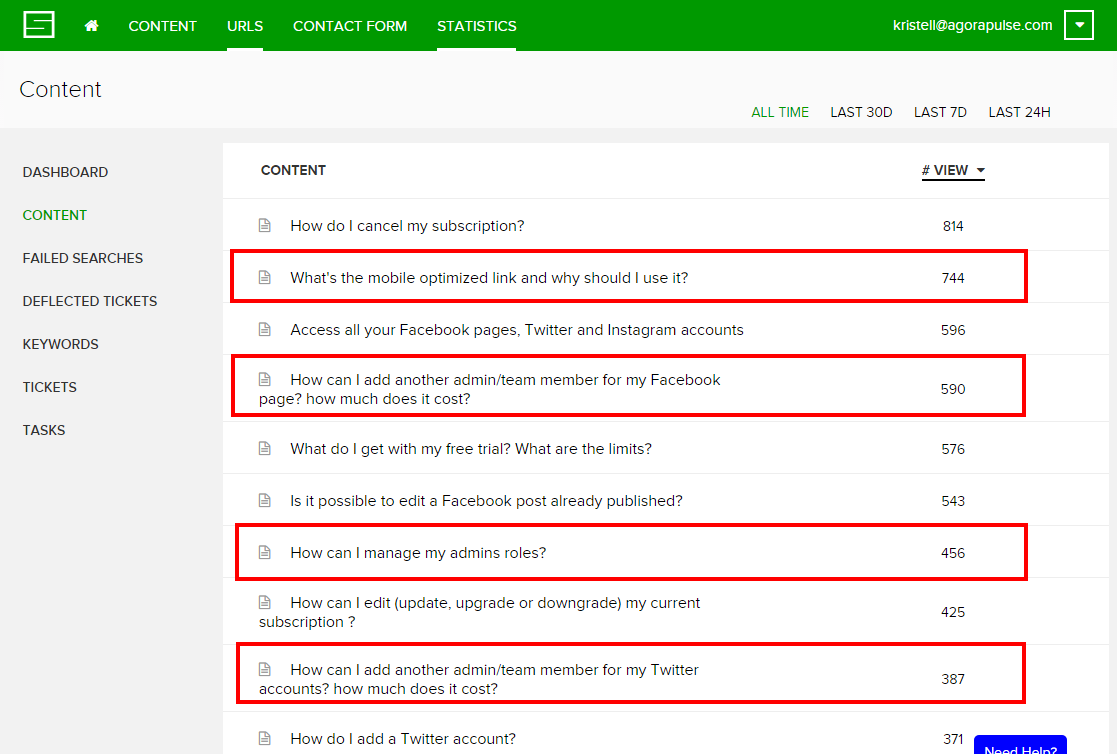
most-viewed-articles-faq

Let me put it this way: if one of your features requires your users to read your knowledge base every time they want to use it, it’s definitely not doing a good job. A great product should be intuitive. I don’t know of any perfect product, of course, but if you look at your support data and identify a feature that requires your users to check your knowledge base all the time or search for answers, then working on making that feature more intuitive will definitely help. You will get more users as well as fewer support requests. Win-win.

Some support tools will help you spot the most-read articles or the most common search queries. To name a few: Help Scout, Groove, and Support Hero.

4. Make Sure All Support Requests Go To One Place

These days, communication goes in all directions – email, chat, in-app messages, Twitter, Facebook, and so on.

Your users don’t care what channel you prefer for support; they’ll use whatever is easiest for them at the time. Since most questions will arise as people use your product, you need to make sure that the way to contact your support team is very easy to spot (see above).

But you’ll always get emails from your website, Facebook messages, tweets, and even chat messages if you’ve decided to respond to your users in real-time. It can be totally overwhelming. Things start slipping through the cracks, conversation history is lost, and the list goes on. This is not sustainable. What you really have to do is concentrate most, if not all, of your support conversations in one place.

To communicate with our users, we’re using five different channels:

  • Email
  • Chat (Olark)
  • In-app messages (Intercom)
  • Facebook
  • Twitter

I have to say it’s challenging. And while we haven’t found any solution that would centralize everything, at least most of it goes to one place.

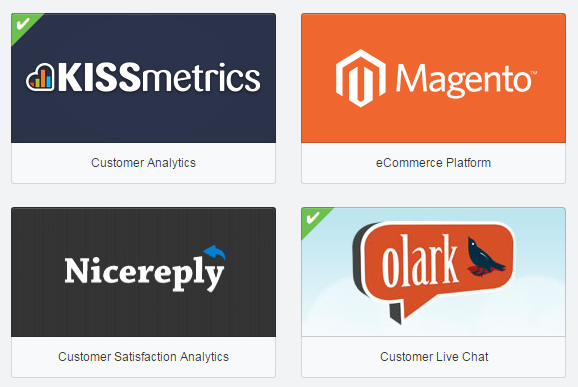
Our tool of choice to group all support requests is Help Scout. Thanks to its third party integrations, we are able to get all the Olark chats forwarded to Help Scout, so if we need to follow up on a chat conversation later by email, Help Scout does the job.
Apps-used-Help-Scout

We receive very few support requests on Twitter, a few more on Facebook. But compared with the 20 or 25 requests we get daily by chat or email, the 4 or 5 requests we get every week on our social channels do not create a real problem. And we use our own tool to handle those social messages – “eat your own dog food,” as they say!

The main problem comes from the conversations we have via Intercom. Intercom is our tool of choice for in-app user communication. But Intercom is far from being as versatile and comprehensive a support tool as Help Scout. Ideally, we should switch everything to Intercom, but given the disruption this would create for our support process as of today and the fact that we’ve based that process on existing Help Scout features, it’s a hard move to make.

Now that Intercom provides real-time chat (it didn’t when we decided to start with Olark) and better support features (it was beyond poor two years ago when we started using it for in-app messages on top of Help Scout for support), if I were starting from scratch today, I would go all-in with Intercom and wouldn’t use Olark or Help Scout.

Help Scout and Olark both offer features that we like very much and would miss, but having discussions with users across several channels is a bigger problem. And we could replace Help Scout and Olark with Intercom, but not the other way around.

However, Intercom is missing a key feature when it comes to providing top-notch support: a knowledge base! Without a knowledge base, my support team would end up in the nuthouse! Fortunately, the solution we use for that, Support Hero, has an API connection with Intercom, and using both together does a perfect job.

5. View Support Differently in Your App and On Your Website

Most SaaS CEOs think about product/technical support when they think about their support framework. They see support as a way to help current users understand how their product works and to help them solve bugs and technical issues.

It’s true that support in SaaS has always been primarily focused on helping current users of our products. But, limiting your support efforts to your current users is a big mistake.

There is actually a much larger population that expects support from you, and it’s a critical population for your business – your prospects. Actually, you probably have more prospects (i.e., website visitors) than current users, and ignoring them can be a very bad idea.

Your prospects will visit your website and check a couple of pages to get a general idea of your product. Maybe they’ll watch your video. If you’ve done a good job with your website, they’ll probably start becoming interested. But that’s also when they’ll start having questions pop up in their minds: Does your product connect with Salesforce? Is it available in Italian? Can we export our data in .csv? Is there a discount for nonprofits?

Most of the time, the answers to these questions will not be on your website. The goal of a website is not to address every potential question a prospective user has about how your product functions; its only goal is to sell the unique value proposition to convince them it’s worth their time digging around.

If you’ve succeeded in capturing the interest of prospects with your big value proposition, kudos to you. But don’t stop there; make sure they can also easily find all the cool features you have to offer.

To give you an example of that, I was recently looking for a new application to run NPS with our users. After a bunch of research on Google, I identified two potential solutions: SatisMeter and Promoter.io. They both had well-designed websites that conveyed their value proposition clearly.

But I needed answers to two important questions before making a decision:

  • Which one(s) will allow me to run a survey “in-app” instead of by email?
  • Which one(s) will connect to Intercom (my CRM of choice) to make sure I can correctly record the responses and leverage them?

Guess what? After scouting the two websites, I couldn’t find my answers. If the one(s) that were offering these features had allowed me to figure this out very quickly via a knowledge base, things would have been much easier and faster. Even more important, I would probably have ignored the competing solutions that were not responding to my questions!

Most important of all, I decided to eat my own dog food a couple of weeks ago and installed the Support Hero knowledge base widget on our website. So I verified all of the above: prospects are not looking for the same answers as current users; their questions will relate to your pricing, the languages you offer in your app, and all the nitty gritty options that you may or may not have (and, of course, which they badly need).

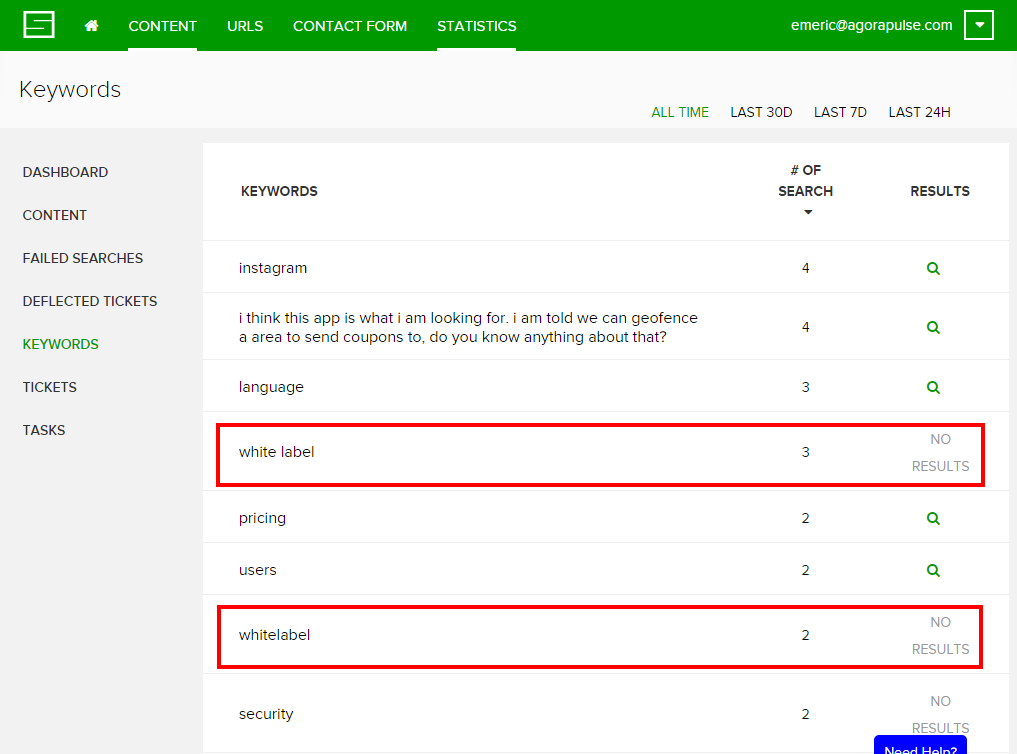
Now look at the screenshot below. Five users wondered if we had a white-label option. We actually do, but as you can see, no content was showing for those requests. I probably lost five customers because I didn’t do my job properly.
Support-on-the-website

Key Takeaways To Make Your Support Work For You (And Not the Other Way Around!)

First, you need to accept that support is not a “set it and forget it” kind of thing. Like everything else in SaaS, you’ll need to constantly iterate, analyze and improve. You’re being lean about your marketing? Your product development? Your pricing? Support is no different.

Second, make sure it’s easy to find support. This really is the most common mistake and it’s easy to fix.

Then, invest in self help support and keep in mind that more than two users out of three will rather find her answer on her own rather than contacting support. There’s a common misconception among startup founders that they need to talk to customers and support is a good way to do that. It’s actually not. When users get frustrated enough to contact your support, knowing that they’ll have to wait more than they’d like to get the help they’re looking for, they won’t be in the right mood to chat with you. Yes, it is a good thing to talk to customers. But it’s not a good thing to force them to do so by not providing them with self help answers.

Finally, understand that support is not a stand-alone activity, it is deeply entangled with everything else you’re doing: product design, missing or messed-up features, marketing and customer success. Make sure you include what you learn from support in everything else you do for your SaaS business.

Your turn. What’s your experience with support? What have you learned that I’ve missed in this post? I’d love to benefit from your experience too!

About the Author: Emeric is the CEO and co-founder of agorapulse, a Paris and San Francisco based Social Media Management Software launched in 2011. Agorapulse is currently being used by more than 5,000 businesses across 180 countries. He is a regular speaker at Facebook Marketing conferences such as the AllFacebook Marketing Conference, Facebook Success Summit, iStrategy and the Online Marketing Institute.

Sunday, August 2, 2015

Are You Ready for the Future of Adaptive Content?

A startling 94% of companies claim that personalization is a key component of their success. Meanwhile, 56% of consumers would happily purchase from a company that provides a good – not even great – personalized experience.

Those kinds of statistics aren’t just impressive, they’re actually driving a new form of content development: adaptive content.

This idea is the new kid on the block. For the purpose of this post, we’ll look at it from a twofold perspective. Adaptive content is a combination of:

  • Using personalization to enhance the customer experience, and
  • Preparing content for delivery across multiple platforms.

These two facets of the term work together to create a complete, well-rounded experience. By implementing it in your content strategy, you’ll turbo-charge your ability to build awareness, trust and engagement with prospects and existing customers.

Adaptive Content Provides a Personalized Experience

Every channel, device and scenario serve as puzzle pieces that make up the consumer journey. If you look at the hundreds of pieces individually, they don’t make much sense. But if you join them together, you can see the whole image clearly.

In content marketing, it’s time that we start looking at the big picture.

This happens through the development and implementation of a comprehensive content strategy. Your strategy should provide enough insight into the mind of the customer that you’re able to determine a clear direction for personalization.

The 5 Elements of Adaptive Content

Before we get any further into the nitty-gritty of adaptive content strategy, I want to talk about the elements you’ll want to look for during the initiative.

Karen McGrane is a superhero on this topic. If you haven’t read her book or heard her speak, you’re missing out on some really great information.

She outlines five elements of adaptive content that are critical to your success. Let’s talk about each of them briefly.

  1. Reusable Content – Develop content that you can use on multiple platforms. You also want the ability to create similar content in different formats to reach a wider variety of prospective customers.
  2. Structured Content – Create small chunks of content that can easily be consumed on multiple devices, regardless of their size.
  3. Presentation-Independent Content – This is the bare bones of your piece. It’s the raw content without ornate or ostentatious formatting.
  4. Meaningful Metadata – This hidden data quickly describes the purpose and intent of the content. This helps for easy interpretation by your viewers, as well as enhanced parsing by the search engines.
  5. Usable CMS Interfaces – Ultimately, you want a simple, functioning system that makes the delivery of all of the above elements possible.

Although I love the elements Karen uses, I think we can simplify it even more. I like to think of it in terms of the common phrase Reduce, Reuse, Recycle.

  1. Reduce the amount of work by systemizing your workflows and processes.
  2. Reuse content on multiple platforms and broadcast your message on every channel.
  3. Recycle (or, repurpose) the published work into different formats to get the most out of it.

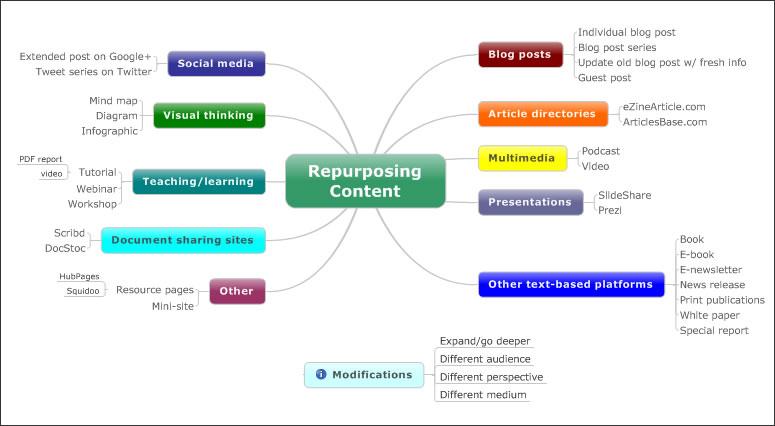
repurposing-content

Source

Once you understand what adaptive content looks like, it’s time to create a stellar strategy…

Build a Strategy for Personalization

To begin, we need to first understand the five Ws. You probably remember them from grade school: who, what, when, where and why. By defining the project’s purpose this way, we’ll be better prepared to understand personalization from a strategic perspective.

1. Create Personas for Your Ideal Audience

Who is your audience?

It’s one of the first questions any content developer should ask themselves. Building a strong persona helps you properly cater to them. And that kind of attention can transform the casual visitor into a brand ambassador.

Before you can create effective adaptive content, you must understand your audience.

Step 1: Delve into an analysis of their goals, challenges and pain points. This will help you determine how to best distribute your content. Check out this overview of the 5 Rings of Buying Insight.

Step 2: Create complex, situational overviews of their needs. Get started by answering these questions about each type of audience member.

  • Who does the audience currently go to to consume a similar product or service?
  • Who would refer them to you?
  • Who do they speak to that may also express interest in your brand?
  • What kind of mood are they in when they find your company?
  • What devices are they using?
  • What interests do they have?
  • Why should they use your brand at all?

Step 3: Conduct primary research that brings even deeper insight. You can gather deeper information through things like:

Ultimately, the research you’ll conduct depends on your specific situation. Focus your efforts on creating a unique approach based on your audience, their needs and the type of business you run.

But one thing is the same, regardless: You must understand the who before you take any further steps.

2. Determine the Best Type of Content

What content best supports the audience?

Too many people have a narrow mindset when it comes to content. They only think of it in terms of written messages or multimedia assets. And while both of those are important components, adaptive content comes from a much higher level of thinking.

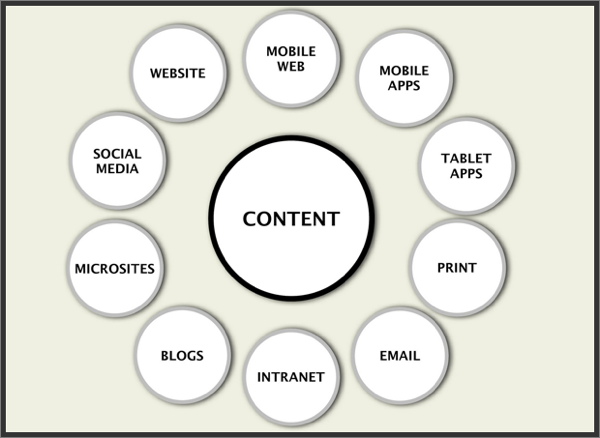
where-content-can-appear-internet

Source

To understand what type of content works best, you’ll develop a distinct four-step workflow. These steps take you through research, architecture, development, testing, optimization and a high-powered launch. Once you’ve accomplished it, you’ll know what kind of content works:

  • Create in-depth personas and use cases.
  • Model functions and features to support user goals.
  • Nurture the relationship with the consumer.
  • Strategically launch, debug and refine the content.

Sound complex? Welcome to the future.

3. Establish Your Adaptive Characteristics

When should you actually adapt content?

By its very nature, adaptive content must adapt. That means, it needs to change based on certain characteristics of the individual audience member.

Step 1: Select the characteristics you’ll use to trigger adaptive content. A few options include:

  • Their current physical location.
  • The date or time of day.
  • What channel brought them to your content.
  • Recent purchase history from your company.
  • Where they’re at in the buying cycle.
  • Micro-conversions they’ve taken through the website.

Step 2: Create adaptive rules that trigger adaptive content based on what you’ve defined.

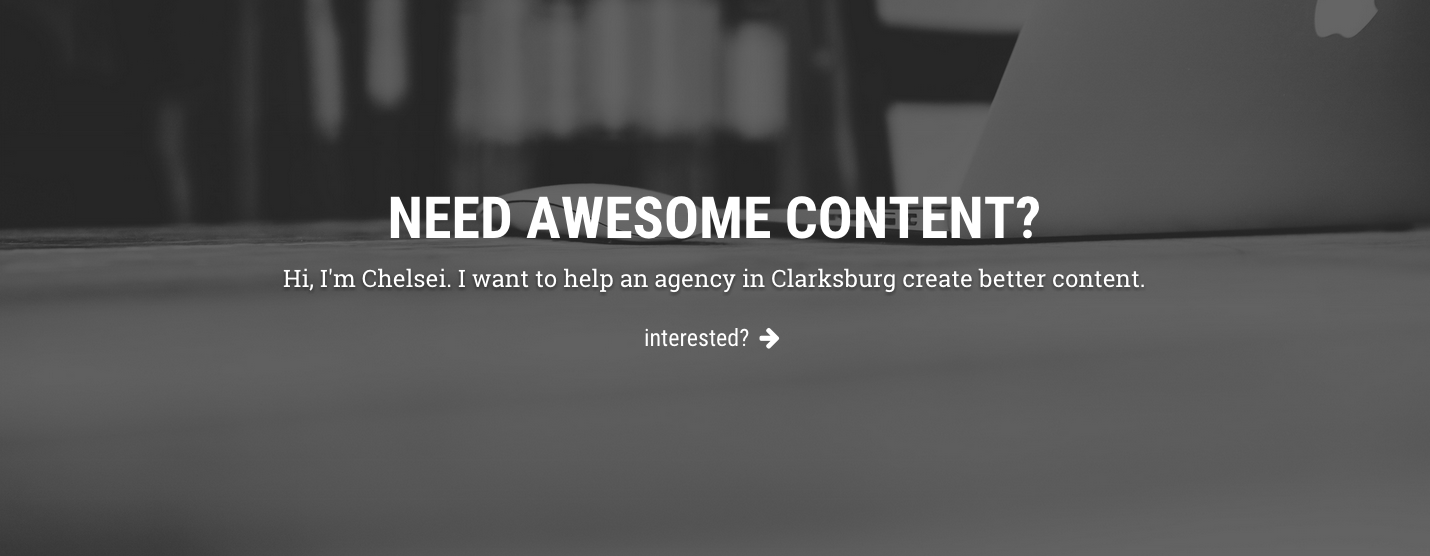
For example, let’s say you run a digital marketing agency. You could create the following piece of personalized, adaptive content:

  • When the home page is loaded by a user in a specific city, display: “We want to help a business in [city] grow through digital marketing. Will it be yours?”

Here’s an example of what that type of rule might look like in practice:

chelsei-adaptive-content

This kind of execution is intrinsic to adaptive content. Personalization happens through small pieces of content delivered in the appropriate context. When done well, it creates the kind of unique experience that users want.

4. Consider the Challenges of Different Devices

Where will you display the content?

Determine how you will visually represent your content, and what effect this will have on your content across different devices.
What looks good on a desktop can cause an unfavorable experience in mobile. With the rise of responsive web design, marketers are seeing the harsh reality of poor strategic presentation.

content-marketing-ensemble

Source

You need to consider the big picture. Truly adaptive content can serve the audience through quality publishing, regardless of the device used. To make this a reality, you’ll need to look at your publishing strategy from a few different angles.

  1. Consider current devices that will consume your content.
  2. Prepare for display challenges for each major device.
  3. Create intelligent content that can handle the quirks of each medium.
  4. Keep new & developing technology in mind for future adaptations (e.g. Google Glass)

Ultimately, you deliver a great experience to every user. That can’t happen with static content that only serves one device. Using these steps helps you focus on the dynamic possibilities.

5. Define Your Reason for Investment

Why are you investing in adaptive content.

You need to build a strong business case for adaptive content. It requires a vast investment of time and resources, so it’s important to understand and apply customer research data.

Build a business case for the executives involved in the decision-making process. You have to justify its benefit for your organization’s specific needs and goals, as well as show how adaptive content truly connects all the pieces of the marketing puzzle together.

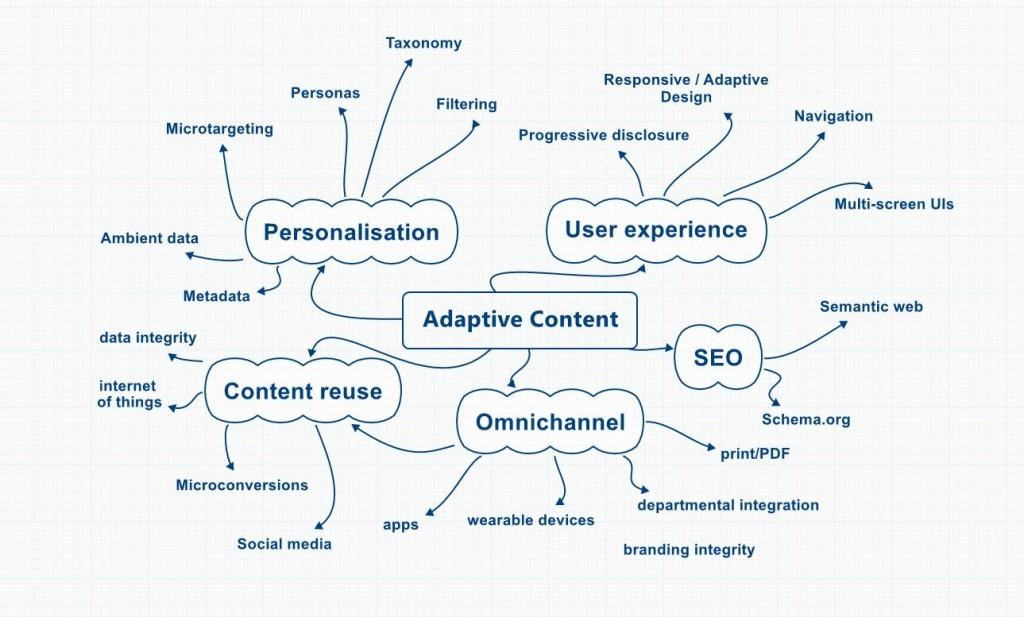
adaptive-content-visualization

Source

Take small steps to start implementing personalized adaptive content if you’re not ready to give it a 100% investment. Even small changes can yield long-term rewards. Start with the training wheels on and make small adaptations that will lead to larger ones down the road.

This is the future of content, and you need to jump on board now before it’s too late.

We’ve talked a lot about high-level complexities today. I’d love to hear your thoughts on adaptive content and how it will shape the future of our content marketing efforts. Share your ideas by leaving a comment below.

About the Author: Aaron Agius is an experienced search, content and social marketer. He has worked with some of the world’s largest and most recognized brands to build their online presence. See more from Aaron at Louder Online, their Blog, Facebook, Twitter, Google+ and LinkedIn.

Saturday, August 1, 2015

Friday, July 31, 2015

How to Succeed at The Most Critical Point in SaaS Sales

If you’re like any other SaaS marketing maven, you want to drive more sales in the best way possible.

And if you’ve given it any thought, you realize the epochal importance of the free trial.

Everything about the free trial is important. I would argue that the free trial is the most critical phase in SaaS sales. Most SaaS sales models place an enormous amount of emphasis on the trial, because, taken broadly, it’s the only marketing method that makes sense.

But that’s where a certain amount of distraction sets in. We obsess over all things free trial, completely missing the whole point of the trial — to get users to use the product!

My goal in this article is to clear the table on the free trial period, and get our heads screwed on right so we can understand how to capitalize on the most important point in SaaS sales.

Let’s Describe What’s Going on Here

Most SaaS sales processes go like this, generally:

  1. Customer is aware of a need.
  2. Customer considers alternatives.
  3. Customer zeroes in on your product.
  4. Customer starts a free trial.
  5. Customer converts into a customer.

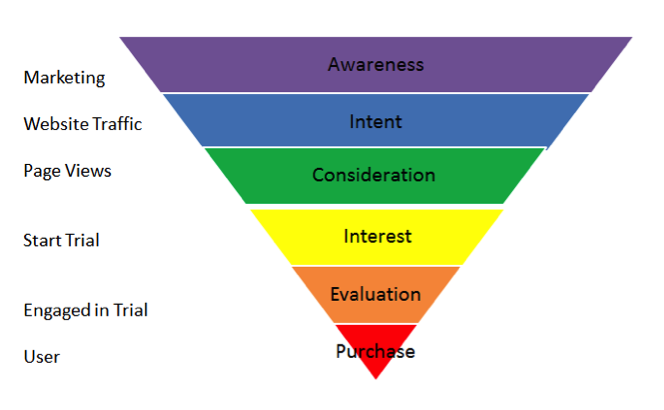
At point four in the list above, the customer is already deep in the funnel. The funnel diagram included below expands it a bit. You can see that the customer is there — starting the trial. They have just a couple microsteps to go until they are a full customer.

marketing-funnel-6-phases

Source

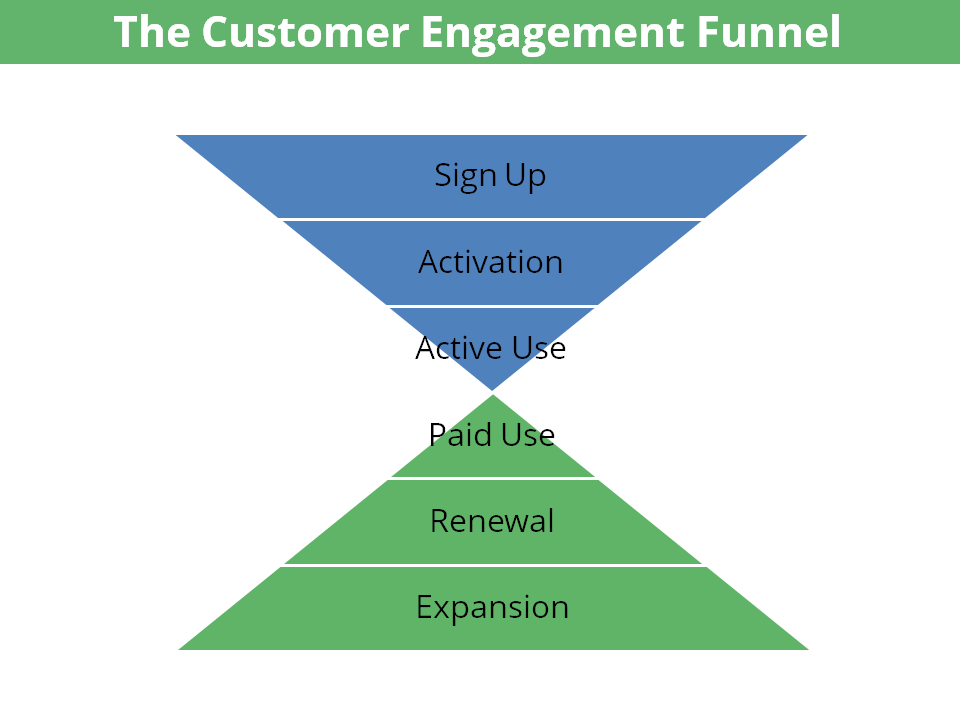
Let’s look at another diagram of this point. This time, I want you to see just how critical it is based on what comes after the purchase point.

customer-engagement-funnel

At the nexus of those two triangles is the transition from free trial to paying customer. You can’t experience the benefits without moving them on from the active use/free trial phase.

And that’s where we need to focus on — getting the customer over the hump of free trial and into the utopia of a closed deal.

Understand What Motivated the Customer to Begin With

One of the best ways to figure out how to get the customer to buy for good is to figure out why they started the trial to begin with.

Let me explain.

Why is a customer going to buy your product? Think through the answer, because this is kind of the whole point of your SaaS, right? What does the customer want to achieve, do, or experience?

That’s the reason why your customer started a free trial. The motivation should be no different.

If you are able to satisfy the customer’s need during the temporary trial, then you can compel them to remain a customer by continuing to satisfy them in the future. SaaS isn’t a one-and-done deal. It’s an ongoing process of serving the customer.

The cause for conversion into free trial and the motivation for conversion into a full customer are one and the same. Problem: solved.

Use the customer’s free trial motivation as the tool to drive engagement beyond the trial.

Map Your Customer Journey

To drive further into the reasons and motivations for attracting and retaining customers, do yourself the service of mapping the customer journey.

customer-journey-model

Source

Why? Because you’re going to experience an epiphany of sorts. Every customer is going to follow a path that takes them from awareness to completion.

One of the most valuable insights from a customer journey map is that you will find out what customers do and see when they sign up for a free trial. You’ll discover whether it’s encouraging or demotivating. You’ll learn what obstacles they may experience when they move through the process.

Look at it From a Long-Term Perspective

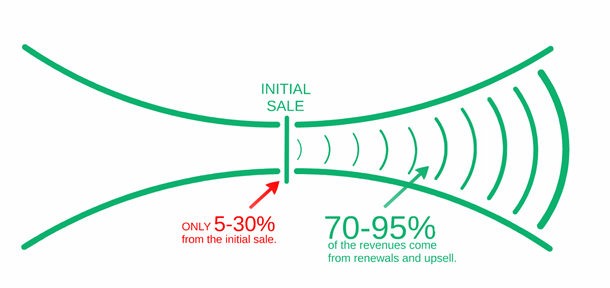
Pictures or diagrams are so much better at explaining things than I am. So, here’s what I want you to do. Look at this diagram for at least ten seconds.

revenue-comes-from-upsells-and-renewals

Source

What do you see? I see that you’re going to gain 5-30% of a customer’s revenue at the initial sale point. I see that a whopping 70-95% of the revenue is going to come a week, a month, or a year down the road.

What does this tell you?

  • To me that says that I need to take a long term view. Customers don’t prove their maximum value until some time has passed.
  • It also tells me that customer retention is killer.
  • Finally, it tells me that none of that revenue will materialize unless I close the sale. Forget 95%. I just need 5% right now!

Even a longview of sales informs me that this is a critical point. So let’s get into some of the tactics.

Get a Perspective On Your Goal: Engagement

If you’re honest for a second, you’ll realize that you can’t make the customer do anything. You can, however, coax them to do something.

That most important “thing” is called engagement.

Engagement can be a slippery term, so let me explain what I mean by it. I agree with Lincoln Murphy from Sixteen Ventures who explained that “Engagement is when your customer is realizing value from your SaaS.”

You see, the customer will only want to buy the SaaS when she actually experiences the value that it can provide. Engagement happens many times in multiple scenarios, but it all boils down to the same experience — value for the customer.

In the critical pre-purchase stage, you must drive engagement. The entire free trial period should be designed around engagement — getting the customer to smell, taste, and feel the value of the product.

Without engagement, there will be no purchase.

Know What You Want the Customer To Do

Engagement is meaningless unless you actually understand what action causes engagement.

A customer can’t realize value from the SaaS unless he is doing something with the SaaS.

Doing what? What do you want the customer to do? That depends on your product and your customer.

For Mention.com, as an example, that could be compelling their customer to create an online alert. So, what does Mention.com do with their free trial? They force customers to engage.

The word force sounds all cruel and violent, but it’s actually quite kind and compassionate. Why? Because they want their customer to actually experience the value of the product right from the get-go. There’s no better way to do so than to engage and launch the trial simultaneously.

Here’s how they do it:

mention-trial-engagement

Now, let’s talk about that little engagement action.

Make Your Customer Do the Engagement Action

Once you’ve decided what you want the customer to do, it’s time to make them do it. I used the word force in the preceding point. To divest the term of its negative connotations, let me provide a more cohesive set of suggestions around this concept.

Emphasize This Action in Your Email Marketing

Email message play a critical role in this critical point in sales. How you say it matters. So how should you say it? Beg, wheedle, whine?

No. Command them. Get them to do the action you’ve selected. Here’s an example of such an email. This email sample comes from Autosend.io, which provides an upsell schedule dashboard for SaaS. They want their trial lead to first log in. Makes sense.

emphasize-action-email-example

Source

Put Dependencies on That Action

What do I mean by this? Show the customer that they will only experience the usefulness of the software if they do the specific action.

Mint.com compels users to add a bill or an account. These two actions are presumably Mint’s engagement action, which will draw the user in to experience the value of the software.

get-started-two-options

It’s kind of like a game. The user has to unlock the next level, so she needs to do a certain action.

Reward the Action

When the user does that action, give them a pat on the back. They’ve earned it. By applauding their action, you can drive them deeper into the experience and engagement of the SaaS.

Remember, it’s all about action. The user needs to do.

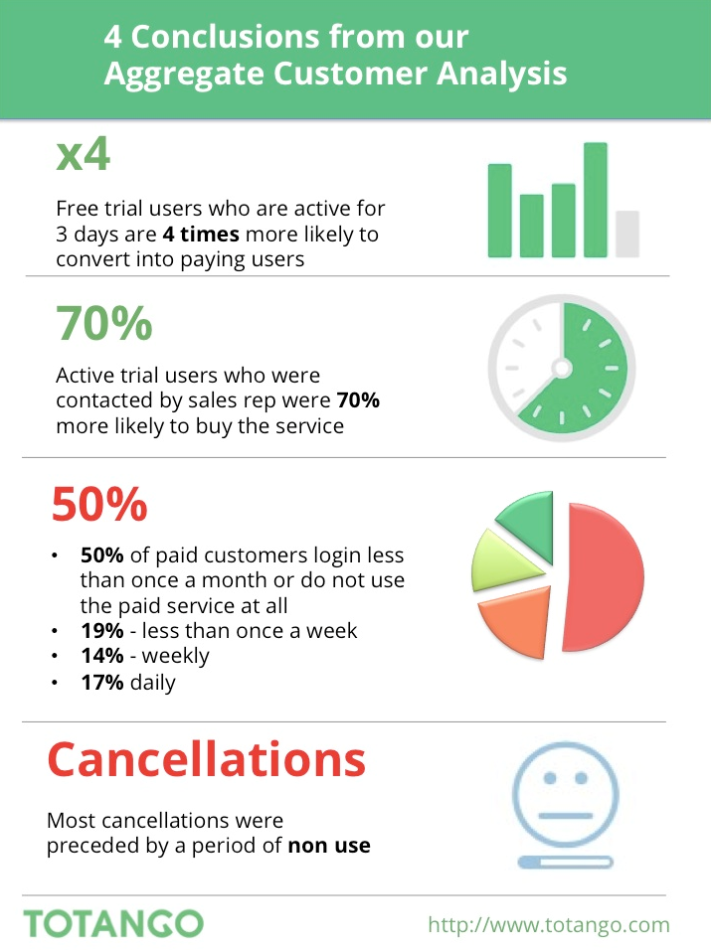
Trial users who stay active are more likely to convert. Notice how Totango sketches out the condition. Trial users are 4x more likely to convert when they are using the SaaS for three days. The opposite holds true, too. A user who cancels is a user who’s not using the SaaS.

totango-customer-analysis

Source

By encouraging activity through a variety of methods, you will improve your success at engagement and sales.

Be Sure to Send a Welcome Email Right Away

According to MIT and InsideSales, the odds of calling to contact a lead decrease by over 10 times in the first hour. You need to be calling them within an hour of them becoming a lead. If you don’t, the chances that you’ll connect with them drastically decrease.

And you should automatically email the free trial user immediately.

The customer doesn’t know what to do after they start the trial. You have to tell them. The way you do that is by sending them an email.

What you say in that email is just as important. There’s a misconception that you need to send them an elaborate letter, complete with details, metrics, motivations, instructions, and all the other things that make for a warm-and-fuzzy welcome experience.

Not quite. The shorter your email, the better.

Here’s an example of a free trial expiration email that I received.

free-trial-expiration-email

Am I going to read that? No. It’s way too long.

Will I read a short message like this?

great-trial-expiration-email-uberflip

Yes.

Short messages are important. You have several days and multiple emails to communicate with the customer – introduction, action, motivation, etc. The free trial is a process and a sequence, but you don’t need to give them every bit of information all at once.

Shorten that email. No, shorter. Shorter…There.

Send Them More Emails

Email is the communication method of choice for the vast majority of SaaS providers. Use email frequently in order to give the user all the information that they need to…

  • Start using the SaaS.
  • Complete the engagement action.
  • Sign up for the product.
  • Your emails should follow a logical series of actions and activities that push the customer to full conversion.

Conclusion

The better you get at converting customers past the free trial, the better you’ll get at SaaS marketing as a whole.

Once you bring customers past the free trial, you can enjoy the massive revenue opportunities, upsells, retention, and awesomeness that follows.

But first, concentrate on getting past that initial hump.

What have you discovered as the best method for converting trial users into full customers?

About the Author: is a lifelong evangelist of Kissmetrics and blogs at Quick Sprout.

Online Marketing News: Twitter Gets Eventful, Facebook Gets Secretive, Google+ Gets Going

Why Are B2B Content Strategies Important

Why Are B2B Content Strategies Important – The Chief Marketing Officer (CMO) Council launched a new study centered on how marketing can more effectively generate qualified sales leads through compelling thought leadership content – a task that has proven to be a struggle for marketers today. Find out more from this great infographic. Chief Marketing Officer (CMO) Council

Survey: 42 Percent of Business Leaders Say Consumers Shame Them on Social – Lithium Technologies, a social customer experience management platform, announced the results of a recent survey performed on its behalf by Harris Poll, finding that brands are increasingly under pressure by consumers to innovate. SocialTimes

Google: Lower CPCs Are Because Of YouTube, Not Mobile Search – For several quarters of declining Google CPCs, financial analysts have speculated and assumed that the migration of usage to mobile and lower bids for mobile clicks were responsible. However on Google’s earnings call today CFO Patrick Pichette sought to dispel that belief. Search Engine Land

Survey: 99 Percent Of Consumers Will Share Personal Info For Rewards, But Want Brands To Ask Permission – Consumers repeatedly say in surveys that they want more personalization — but also more privacy. This is an apparent contradiction. But maybe it’s not. Marketing Land

Study: Men and Women Use Hashtags Differently – In a column for The Atlantic this month, “Why Men Are Retweeted More Than Women,” the journalist Jessica Bennett argues that men and women use hashtags differently. Social Media Today

Study: Forget About Average Organic CTRs, They Mean Nothing – Many marketers try to benchmark their organic search performance against industry average click-through rates (CTRs). This turns out to be a mistake. Search Engine Land

Less Than 1/3 Of The World’s Top CMOs Are Active On Twitter – Of Interbrand’s top 100 global brands, only 31 have CMOs or top-level marketing executives actively participating on the social network. Marketing Land

New Report Highlights Significant Benefits and Challenges of Real-Time Marketing – Real-time marketing is one of the most important trends of the connected era, with various reports underlining it’s growing relevance, particularly in regard to meeting rising consumer expectation. Social Media Today

Google+ Isn’t Dead, Will Continue As “Connection” Platform, Says Google – Google VP Bradley Horowitz says ending the requirement to use Google+ to engage with other Google products will allow the company to make a “slew of improvements” to the core social network. Marketing Land

Twitter Launches Event Targeting – When major events like the World Cup take place, millions of people flock to Twitter to check out the buzz and voice their opinions. Twitter

Facebook Announces Secret Videos For Publishers – Facebook is excited to introduce enhancements to our video upload system and a new Video Library. The enhanced video upload flow gives Page owners customized distribution options for videos on Facebook, while the new Video Library is a simple, centralized place to manage videos. Facebook

Report: 89% Of Marketers Have Problems With Cross-Channel Marketing, Data Linkage Is The Biggest Culprit – A new study shows that data linkage is again the biggest challenge to marketers and their cross-channel marketing efforts. Marketing Land

From our Online Marketing Community:

In response to Why Collecting Customer Information & Listening to Feedback Can Make You a Better Marketer, 40deuce said, “Great advice in here Ashley! I completely agree that your current customers are a great insight into how you can help to gain new customers. Keeping your current customers happy by listening to what they have to say and working with them to be better will not only help you to keep them as a customer, but likely also make you more attractive to new customers. As well, I’m always a firm believer that if you can keep current customers happy that they will be the ones who really help you to bring in new ones.”

Gini Dietrich said, “Amen!”, to Why Content Marketing is Imperative for the Future of Public Relations.

And on What You Need to Know About Playing High Stakes Content Marketing, paulnetke shared, “Hey Ashley, thanks for sharing these great content writing ideas with us. These ideas will really help to boost any content on the web. I live in Sweden and so I always take help of a good content marketing agency in when it comes to content marketing strategy. This blog has helped me a lot and is very interesting. Looking for similar stuff from your side in future as well….”

What were the top online and digital marketing news stories for you this week?

Thanks for reading and have a great weekend!

Infographic: Chief Marketing Officer (CMO) Council


Email Newsletter Gain a competitive advantage by subscribing to the
TopRank® Online Marketing Newsletter.

© Online Marketing Blog - TopRank®, 2015. | Online Marketing News: Twitter Gets Eventful, Facebook Gets Secretive, Google+ Gets Going | http://www.toprankblog.com

The post Online Marketing News: Twitter Gets Eventful, Facebook Gets Secretive, Google+ Gets Going appeared first on Online Marketing Blog - TopRank®.

#SocialSkim: Amazon Launchpad for Startups, Plus 13 More Stories in This Weeks Roundup

Learn about Amazon's support for startups launching products. Also: Yahoo Livetext, managing relationships with short-form content creators, and the socnet growing the fastest. And is Twitter really cracking down on stolen jokes? Skim to stay in step. Read the full article at MarketingProfs

Email Marketing: Tips for tech support selection and contract negotiation

In the world of marketing, there’s always a push to stay ahead of the curve and, more importantly, ahead of competitors.

However, it’s hard to dedicate the time, money, manpower and technical know-how to launching truly eye-catching (and revenue-generating) campaigns. This is especially true for smaller companies with marketing teams consisting of only one or two employees.

Enter the potential best friend to most campaigns: the vendor.

At the MarketingSherpa Email Summit 2015 Media Center, Erin Hogg, Reporter, MarketingSherpa, sat down with John A. Caldwell, President and Founder, Red Pill Email, to discuss the finer points of vendor negotiation. Specifically, John explained what to look out for when considering tech support vendors and what you should — and shouldn’t — negotiate when it comes time to draw up a contract.

Watch the below interview to learn tips on how to handle vendor negotiation:

What to look for when it comes to tech support

John emphasized the importance of interviewing the companies you’re considering for tech support. It makes sense. Your company is going to end up spending several hours with the employees of the tech support vendor you choose.

It’s in your and your company’s best interest to make sure you’re not just looking for the best price but also the best support.

“Make [interviewing tech support people] part of the purchasing process, part of your due diligence,” John said.

When interviewing vendors, remember to keep your company’s needs at the forefront of your questioning. Specifically, John recommended asking interviewees about concerns your company has, what kind of questions they typically receive and what the vendor’s turnaround time and process is.

“There’s ticket time and there’s resolution time,” John said. “Some vendors will put a ticket in, and they have X number of hours to act on that ticket. Their ticket time may be 24 hours, but the actual resolution time is, say, an hour. That might not work with your company.”

“You don’t want to wait until you’re at the point of contract or after contract to find that out,” he added.

He also recommended asking your representative to give you the tech support line and to call it. This will give you an idea of how quickly they answer the phone.

“It’s good to interview them too. I find that helps a lot — no surprises,” he said.

Navigating the contract 

John’s advice was framed primarily through his emailing background, but it’s also applicable as general advice when it comes to drawing up the vendor contract. His main piece of advice? Don’t be afraid to ask questions.

Specifically for email, John emphasized focusing on the break points.

“Little things like [penalties] can have big consequences a little further down the road. Other things you can negotiate,” John said. “There are hard costs, there are soft costs.”

For example, for an emailing vendor, a hard cost may be a Secure Sockets Layer (SSL) certificate. The cost of this certificate most likely won’t be something the vendor will negotiate because it will be paid for out of pocket. This is a hard cost.

However, if that vendor is already paying an employee to set up the systems, the vendor may be able to lower the set-up fee. This would be a soft cost.

“Don’t be afraid to go ahead and ask, ‘What can I get away with?’” he advised. “But don’t be firm on something that is a hard cost. Accept those, and hammer them on the soft costs.”

John joked, “And vendors that are watching this, they’re not going to be too happy with me right now.”

You can follow Kayla Cobb, Reporter, MECLABS Institute, on Twitter at @itskaylacobb.

You might also like

Register for MarketingSherpa Summit 2016 — At the Bellagio in Las Vegas, Feb. 22-14

Watch Full Sessions from Email Summit 2015

MECLABS Email Messaging Online Course [Register now]

Vendor Selection: A 5-step process for choosing a marketing automation solution or agency [More from the blogs]

Marketing Automation Vendor Selection: B2B marketer reduces unqualified leads 341% [MarketingSherpa case studies]

Vendor Selection: Test leads to $500,000 in revenue and 20% lead gen connect rate [MarketingSherpa case studies]